Cette page n’existe pas encore dans votre langue. Vous lisez le texte anglais.
Knowledge base
Open a one-off profile
One button opens it
There is no form and nothing to fill in. The profile is created and launched in the same press.
- 1
Open the Profiles tab
The first item in the left column.
- 2
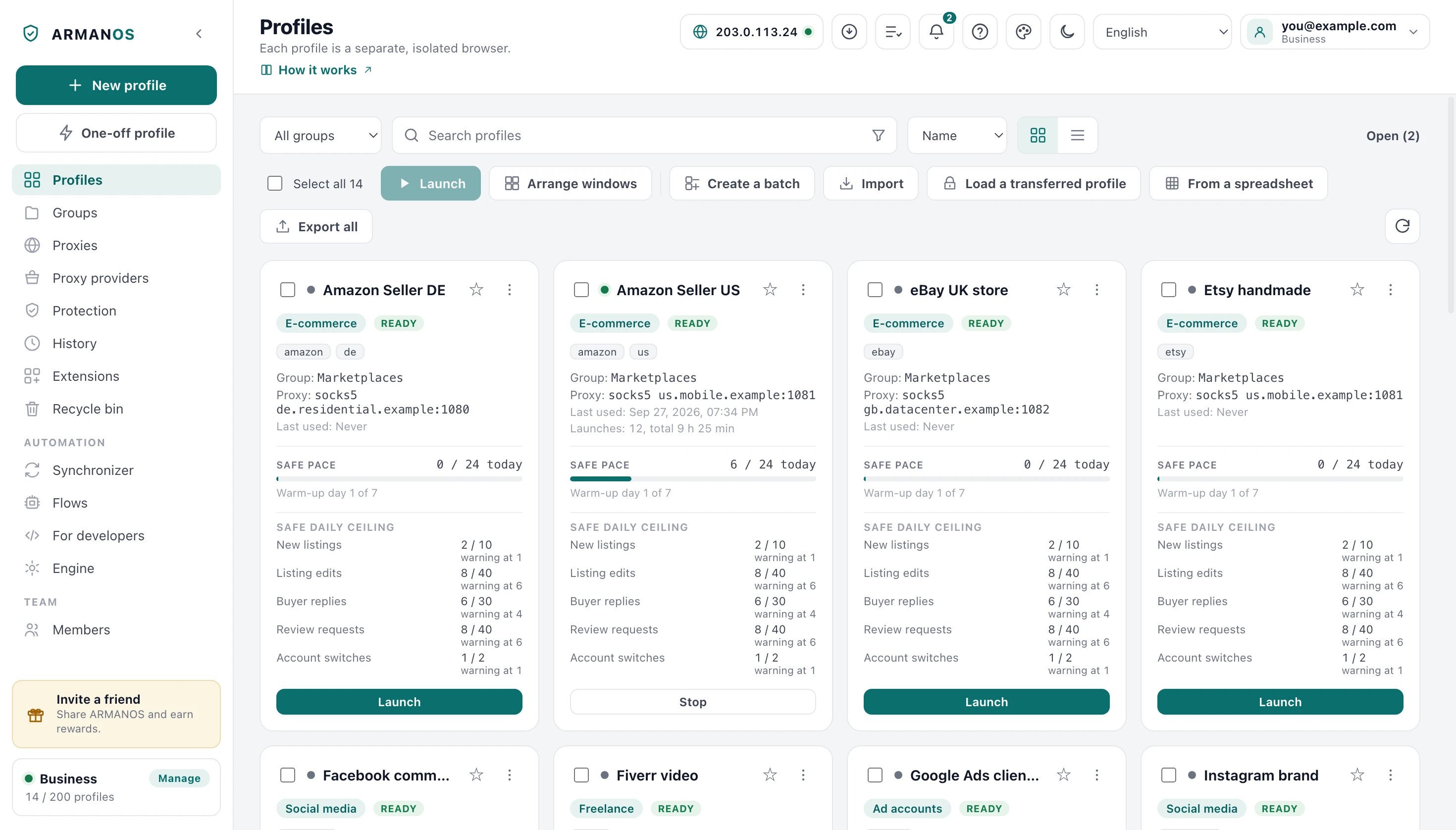
Press One-off profile
In the left column, right under New profile.
- 3
Wait for the window
It opens on its own, without passing through the list.
What it is made of
A name made from the time of day and the Privacy scenario. Nothing else is chosen for it by the button.
Its fingerprint is generated the way every profile's is, from its own number and its template.
The badge in the list
While it is open the row carries a one-off badge, and the hint on that badge says exactly what will happen: removed together with its window, along with its cookies and sign-ins.
What happens when you close it
The window closes and the profile is removed for good rather than moved to the recycle bin. Its browser data folder goes with it, because those are the traces nobody wanted kept.
A one-off profile that failed to open is removed the same way, instead of sitting in the list forever.
If the app crashed and the one-off window closed along with it, the profile is removed the next time ARMANOS starts.
When the removal fails
If the files could not be removed the app writes a notification naming the profile and asking you to delete it by hand. Silence there would leave the cookies and sign-ins of that very sitting on the computer.
Not removed has to be said out loud
When a normal profile is the right one
Anything you will come back to needs a profile that survives its window: an account, a warmed session, a proxy you chose on purpose. A one-off profile keeps nothing, and that is the whole idea of it.
A one-off profile from a script
A script makes the same kind of profile with one request, POST profile/quick to the local API. The request can give it what the button does not: a fingerprint template, a proxy, cookies, an opening address and a launch without a window.
Once closed, it is removed the same way as one made by the button, and it is not sent to the account either.
What this does not do
- The button does not give it a proxy. Made by one press, it goes out from your own address; a script can pass a proxy in its request, or you make a normal profile instead.
- It does not reach your other computers. It is created on this machine and never sent to the account.
- It does not pass through the recycle bin. Once its window is closed there is nothing to restore.
Where this is decided
Each claim above is one place in the code and one stand.
- It is removed on both engines and is never sent to the account
- apps/desktop/test/pinned-and-temporary.js
- Removed means the browser data goes too, not only the row
- apps/desktop/test/delete-leaves-nothing.js
- A failed erase is reported rather than swallowed
- apps/desktop/test/purge-honesty.js
- Its fingerprint comes from the same generator as every other
- apps/desktop/test/fingerprint-version.js
- One left behind by a crashed app is removed at the next start
- apps/desktop/test/одноразовые-при-запуске.js
- A script request makes it with a template, a proxy and cookies, and it is removed after closing
- apps/desktop/test/api-одноразовый.js · apps/desktop/test/api-одноразовый-живьём.js
Questions
- Does it take a slot of my plan?
- While it is open, yes: it is a profile like any other. Closing the window frees the slot with it.
- Is its fingerprint weaker?
- No. It is generated the same way as any other profile's, from that profile's own number and template.
- Can I keep one I liked?
- No. It is built to disappear, so anything worth keeping should be started as a normal profile.
- Which engine does it open in?
- The one this install uses. It is removed on both of them when its window closes.
Next to this
Create your first profile
When you do want to keep it.
Delete a profile
The two-step version for normal profiles.
Profiles
The whole feature, not one procedure.
Privacy
The scenario a one-off profile is born with.
Profiles over the API: list, edit, one-time, cookies, export
Every field of the POST profile/quick request.
Try it once
The free plan gives two profiles, with no time limit and no card.