Questa pagina non è ancora nella sua lingua. Sta leggendo il testo in inglese.
Phone profiles
A profile a site reads as a phone
- 22
- handsets in the phone pool, each taken whole
- Whole
- what a model brings: screen, GPU, cores, fonts
- 5
- touch points, as Chrome on Android reports
- One build
- a phone profile renders on the desktop engine
What a phone profile is
A phone profile is an ordinary ARMANOS profile on the Android template: same cookies, proxy and schedule as any other. It is not an emulator and not a phone in a rack.
Where the line runs
The handset comes whole
On the desktop templates the generator may mix parts, because such machines are really sold. A phone is not built that way, so the model arrives whole and stays with the profile.
Screen and pixel ratio
Both come from the model, and available height equals screen height.
GPU pair
Vendor and renderer as ANGLE reports them on Android.
Cores and memory
From the handset row, in steps a browser really reports.
Model
Chrome froze it out of the User agent; client hints carry it.
Android version
Never older than the handset's own launch version.
Vendor fonts
The Android core set plus the shell's own families.
What the page actually sees
The seed reaches the engine on the command line and is applied inside it, before any page script. These are the engine's own answers, not values written over real ones.
- navigator.userAgent
- Mozilla/5.0 (Linux; Android 10; K) AppleWebKit/537.36 (KHTML, like Gecko) Chrome/153.0.0.0 Mobile Safari/537.36
- navigator.platform
- Linux armv8l
- screen.width × screen.height
- 360 × 780
- devicePixelRatio
- 3
- navigator.maxTouchPoints
- 5
- userAgentData.platform
- Android
- userAgentData.model
- SM-S911B
- userAgentData.mobile
- true
- userAgentData.formFactors
- ["Mobile"]
- userAgentData.architecture
- arm
- navigator.hardwareConcurrency
- 8
- navigator.deviceMemory
- 8
- WebGL renderer
- ANGLE (Qualcomm, Adreno (TM) 740, OpenGL ES 3.2)
One profile on the phone template, launched on ARMANOS Browser. Another profile draws another row.
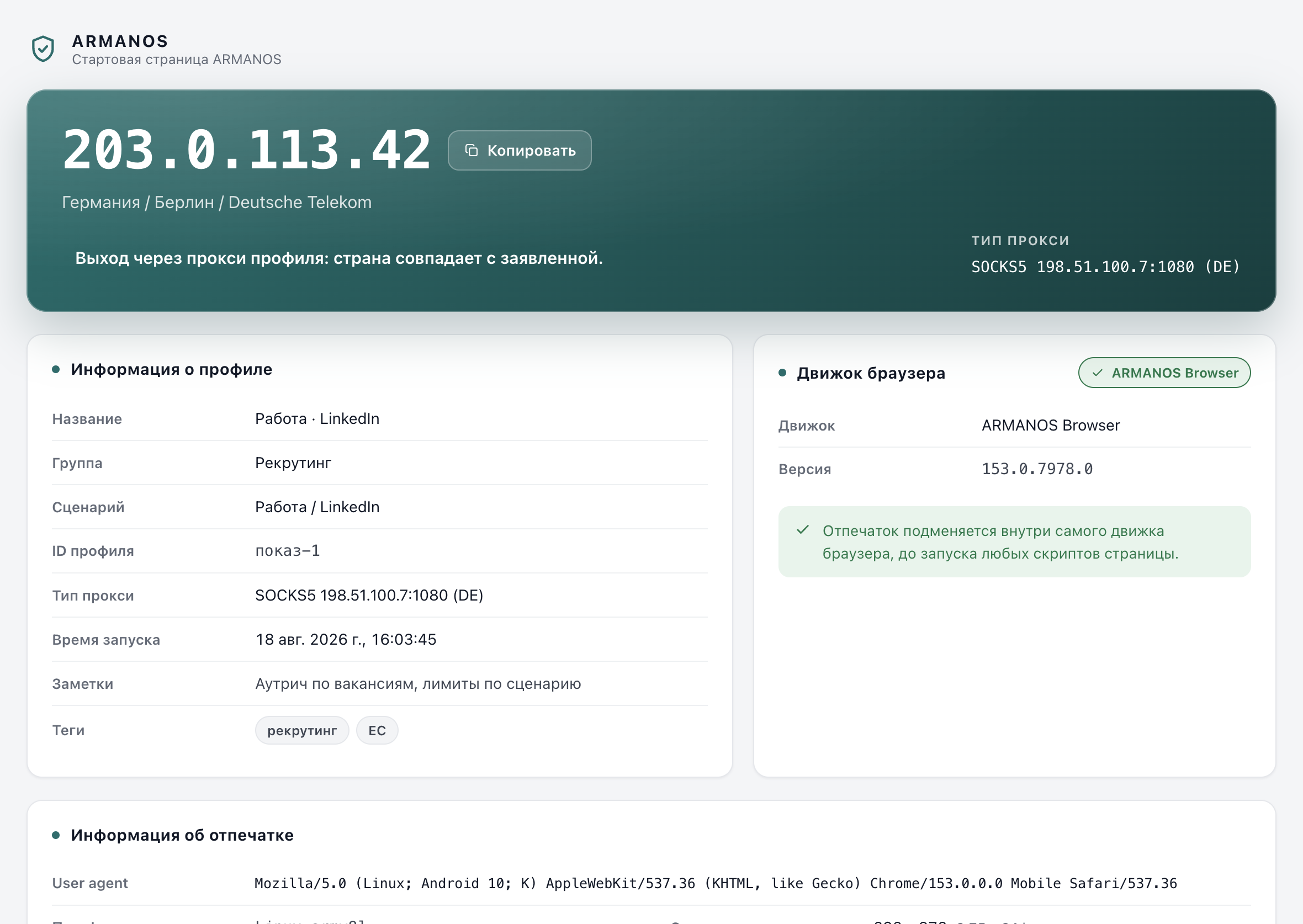
Where the window size comes from
Ask a desktop Chromium for a window 360 points wide and you get 500, measured on the built engine. So it is brought to the handset size over the debugging protocol.
Window size
A launch key for the first window, then an override for every page and new tab.
Touch
The touch events launch key, plus the points from the seed.
Coarse pointer and no hover
Settings naming the finger and the absence of a mouse.
Screen orientation
Derived from the dimensions, so it cannot argue with them.
Mouse becomes touch
A live handset sends no mouse events, so clicks become touches.
If the outfit does not land you are told
How to create one
It is one field in the profile form; everything else works as on a desktop profile. Under the picker stands an honest note about what this computer cannot do.
- 1
New profile, then the template
Pick Android · Chrome (phone), or the tablet one.
- 2
Read the note under the picker
It names what this machine cannot do for a phone.
- 3
Attach a proxy as usual
The template describes the device, not the route.
- 4
Pick the device after creating it
Fingerprint > Change values > Device. Screen, ratio, GPU, cores, memory and fonts come with it.
- 5
Launch
The start page opens first, the window comes down, then the site.
The connection fields
A phone whose network numbers match a laptop disagrees with itself. The numbers follow the browser's own rules: latency in steps of 50 ms, throughput stopping at 10 Mbps.
downlink
Phone 1.5 to 8 Mbps, desktop 5 to 10: identical numbers would be the mismatch.
rtt
Phone 100 to 300 ms, desktop 50 to 200.
effectiveType
From latency, against the same thresholds the engine itself uses.
type
Cellular or wifi, on a phone profile only: desktop Chrome has no such field.
downlinkMax
From the engine's own table, never below downlink and matching the subtype.
When a phone profile fits
Use it where the site behaves differently for a phone, or where the account's history is a phone's. Not where the work needs the device.
| What you need | Phone profile | Desktop profile | A real phone |
|---|---|---|---|
| Mobile layout and client hints | Yes | No | Yes |
| Touch events and a coarse pointer | Yes | No | Yes |
| The model in client hints | Yes | No, empty | Yes |
| A window the size of that screen | Yes | No | Yes |
| An app from a store | No | No | Yes |
| The handset camera and sensors | No | No | Yes |
| An SMS code on the device | No | No | Yes |
| Dozens of identities at once | Yes | Yes | No |
The honest gap
A real device has hardware, and nothing here adds hardware: counts are stated, capture is not. A cloud phone service rents a real handset instead, one session at a time.
No camera or microphone of a phone
The counts are stated, the capture is not.
No sensors
No accelerometer, no gyroscope, no ambient light.
No SMS and no phone number
A code sent to a handset never arrives here.
No application store
Anything installed from a store stays outside the browser.
No phone fonts on your computer
Roboto and Noto are not there, and the app says so.
What this does not do
- It does not turn your computer into a phone. No handset camera, sensors, SMS or store: those questions get the host machine's answer.
- It does not carry the phone's own fonts. The app says so under the picker, and a site measuring fonts sees it.
- It does not give the profile a mobile network address: the route is the proxy you attach.
- It does not decide how a site treats the profile. It states what a phone states, and the judgement stays there.
- The three Android-only connection fields need a kernel that declares it substitutes their values. An older kernel does not get them.
Check it in the code
- A template carries a whole device
- packages/shared/src/index.js · apps/desktop/test/mobile-really-mobile.js
- The window comes down on both engines
- apps/desktop/src/lib/mobileEmulation.js · apps/desktop/src/lib/mobileWindow.js · apps/desktop/test/mobile-window.js
- The mobile launch keys go only to a mobile profile
- apps/desktop/src/lib/forkEngine.js · apps/desktop/test/mobile-window.js
- The connection fields reach a phone profile only
- packages/shared/src/index.js · apps/desktop/test/поля-связи-телефона.js
- The Fingerprint self-test reads the phone values back
- apps/desktop/src/lib/fpAudit.js · apps/desktop/test/mobile-selftest.js · apps/desktop/test/телефон-живьём.js
Questions
- Does the tablet template count as mobile?
- In client hints it says it is not mobile, and its User agent has no Mobile token, as on a real Android tablet. The window still comes down to the tablet screen, and pages are laid out by the mobile rules.
- Can an old profile be switched to the phone template?
- Only if its fingerprint generation knows the template. An older profile keeps a frozen generator, and the app declines.
- Can I stretch the window myself?
- You can, and the profile does not remember it: a window wider than the screen it claims exists nowhere.
- Can two profiles get the same handset?
- They can, and it is no problem: address, cookies and history differ. Choose the model by hand to keep them apart.
- Will a mobile application work inside it?
- No. Anything from an application store lives outside the browser, and this is a browser.
Check it on your own machine
Create one profile on the phone template and read what it hands the page.