このページはまだお使いの言語では用意されていません。英語の文章をご覧いただいています。
Access is paused for now
Changelog
What's new
- 0.1.0
- App version
- ARMANOS Browser 153.0.7978.0
- Engine
- 6 files, 3 systems
- Release files
- 6 September 2026
- Last published
What is in this build
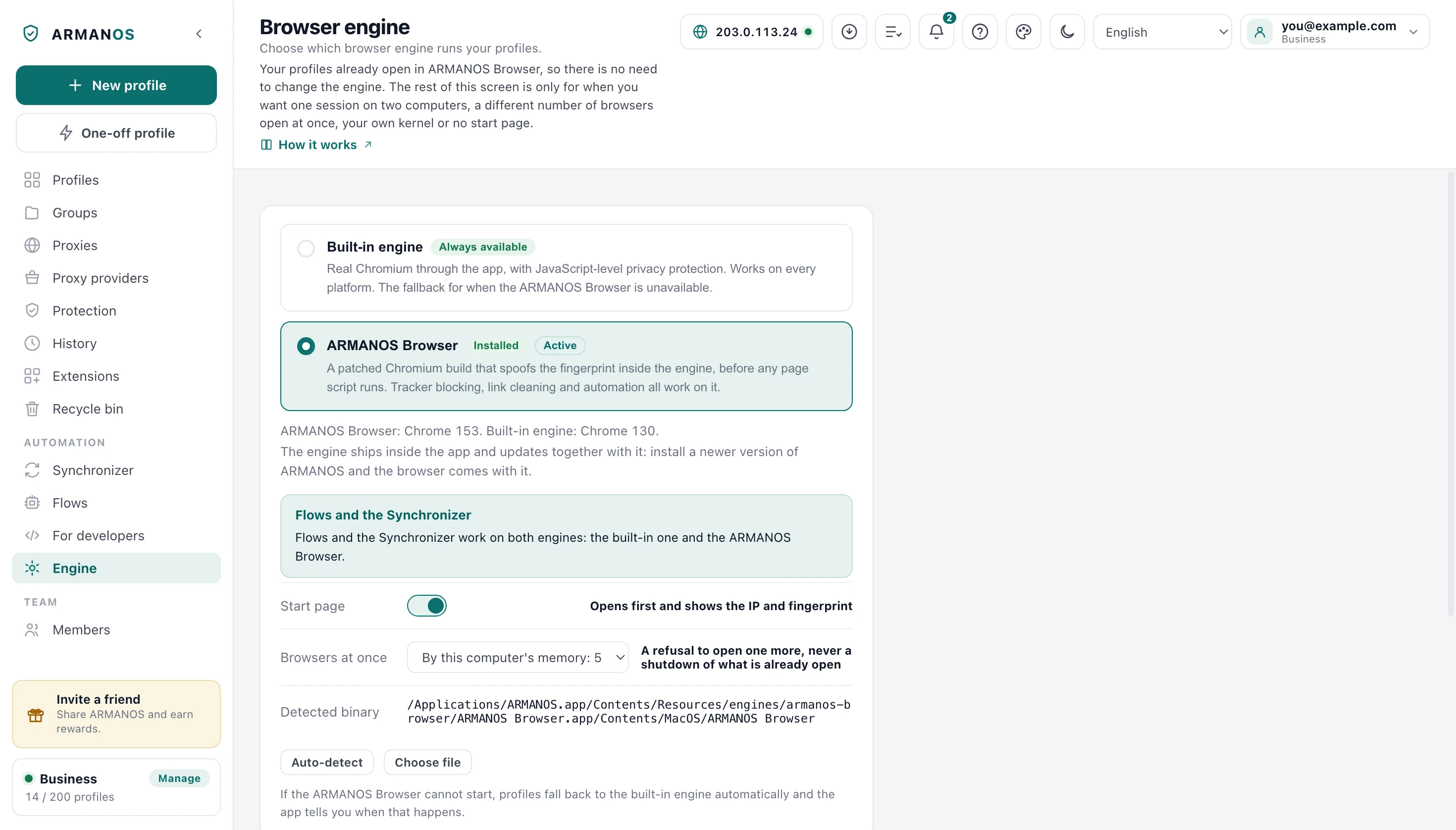
ARMANOS is one app with a browser inside it, and that browser is a Chromium build we compile ourselves.
This build says its version in three places, and they are not allowed to disagree.
- App version
- 0.1.0
- Engine
- ARMANOS Browser 153.0.7978.0
- Built-in engine
- Chrome 130, the one inside the app
- Fingerprint generation
- 4
- Engine capabilities declared
- 9
- Automated checks
- 11018: server 1535, app 8454, site 1029
The check count comes from the last green run.
September 2026 entry by entry
Most of this month's entries are about one thing: getting the compiled engine onto every platform and into your hands. Builds for all three systems went out in the first week of September.
1 September 2026: the Linux builds were cut
AppImage and tar.gz were produced on an engine compiled on 31 August. They were deliberately not offered for download at the time: nothing had ever run them on a Linux machine.
2 September 2026: the Windows engine and both Windows builds
chrome.exe and chrome.dll carry ARMANOS Browser 153.0.7978.0 in their version resources, so the file properties show our name and not somebody else's. The installer and the portable build were cut the same day on a Windows host.
5 September 2026: three reviews, and the money findings closed first
The site was read along eight axes: of 55 claims about it, 28 held up. Across the server and the app 45 findings were confirmed and 43 closed. Buying extra profiles now leaves your subscription alone, and the plan card shows exactly as many profiles as you have.
5 September 2026, 23:13: the Intel engine was ready
The Intel build came out that evening: linking had been starved of memory for three hours by other programs on the machine, and the write phase started the moment they were closed.
What landed on 6 September
Dates below are the day the work landed, not the day it was planned. Where a build and its verification happened on different days, both are named.
6 September 2026, night: both macOS images built and opened
Each image was mounted and that day's code was found inside. The Intel build was then started under Rosetta on an Apple Silicon machine: five processes in fifteen seconds, window initialised without errors.
6 September 2026: every published build carries the compiled engine
macOS on both chips, Windows x64 and Linux x64 ship the browser inside the installer, and on first run the app picks it for you.
6 September 2026, night: unsent edits are tracked field by field
While you are offline the app remembers not that the profile changed, but which fields you touched. So when you come back online you do not write over a colleague's change to a field you never opened.
6 September 2026: the download page got real build switchers
That day each card got its own choice: Apple Silicon or Intel, installer or portable, AppImage or archive. One button led exactly to the chosen build, the file name and size under it followed the choice, and all of it worked with keyboard and screen reader.
6 September 2026: Linux was checked by running it on Ubuntu
A workflow on a clean Ubuntu 22.04 machine took the AppImage from the release and opened a profile with it. Only after that did the Linux card appear on the site.
6 September 2026: signing in on the site carries into the app
A one time code, valid two minutes, opens armanos://login in the app, so you do not type your password a second time.
6 September 2026: Enable installs an extension straight away
The server seeds the extension catalogue from the shared package at start and on demand, and Enable installs the files itself when they are missing.
6 September 2026, 13:27 and 14:03: installers, site and server published
Six files went into the public release, then the site and the server were deployed with the standard script. The live site was looked at by eye at 1440 and 390, and all six links were requested from outside and checked for their real size.
Which engine a new install uses
Since 6 September every published build carries the compiled browser inside the installer, so on first run the app selects it. The built in engine stays the default only where no compiled one exists.
Nobody overrides your choice afterwards, and the built in engine stays selectable as the fallback. When that fallback happens the app says so instead of quietly running something else.
Linux checked by running it
The Linux builds were ready on 1 September and stayed hidden on purpose: until 6 September nobody had opened them once. Offering you a file when you do not know whether its window comes up is not a release.
The verification runs on a machine that is not ours: a clean Ubuntu 22.04, started by hand. The AppImage for it is pulled from the release, so what gets tested is exactly the file that goes into the release.
- 1
Download and unpack without FUSE
The AppImage comes from the release and is extracted with APPDIR set.
- 2
Start under a virtual display
The app runs under xvfb with the local API switched on in advance.
- 3
Create a profile and open it
The shortest path that touches the engine, the fingerprint and the window at once.
- 4
Read what actually answered
ARMANOS Browser 153.0.7978.0, the local API after 4 seconds, and a window with no errors.
Sign-in handoff from the site
You sign in on the site once and the app picks that sign-in up. The code that carries it is 24 random bytes, it lives two minutes, and it works once.
In the app the login finishes through the same path a typed password takes. The same link never works a second time under any circumstances: the code is gone on the first exchange, before any expiry is checked.
macOS
The system delivers the link through the open-url event, running or not.
Windows and Linux
The link arrives as an argument to a second instance, or to the first one.
Either way
You will find that login on the History screen marked «via a link from the site».
Unsent edits by field
While you are offline the app remembers not that the profile changed, but which fields you touched. A profile has nine such fields.
So when you come back online you do not write over a colleague's change to a field you never opened. The app sends only what you owe and takes the neighbouring fields from the server.
Only what you touched is marked
The Edit profile window sends all nine fields on save, so only what you really changed counts as a debt.
Neighbouring fields come from the server
Only the field that has not arrived yet stays local.
The catch up carries only the debt
Pairs travel together, a proxy with its library link. The app sends no empty request.
An edit made during the send is not lost
A field you change while the request is in flight stays in debt and goes out next.
An edit from an older install is not lost
A mark with no list of fields reads as everything changed, so nothing is dropped.
What is knowingly unfinished
Everything below is true today, and each item is written down in the repository rather than only remembered. That is why it is named here without softening.
Three of the six are the owner's decisions and are deliberately last in the order of work: signing, notarization and the payment provider.
The Windows installer is not signed
Windows warns you on the first launch, and the download page says so next to Windows in all 22 languages.
The macOS images are not notarized
The first launch needs Open Anyway in Privacy and Security. Developer ID and notarization come at the end.
The Windows build is from 2 September
It misses three changes from 6 September: the keychain prompt, the login handoff and the extension install path.
Card payment is not connected
The checkout is written and stays inert without keys, and plans are granted by hand until a provider is chosen.
The app does not fetch updates yet
It never checks by itself, and a check started by hand reports an error rather than «You are on the latest version».
Two engine gaps are written down
The automation bit is still cleared with a launch switch rather than inside the engine, and the macOS engine is named after compiling.
How a release is cut
The steps below are a script, not a habit. The order matters: verification happens on the built files before anything is uploaded, and again from outside after it.
- 1
Build
The images and executables are produced for the current host, and Windows binaries need a Windows host.
- 2
Look inside the built files
Each one is opened and searched for markers of the code this build was made for.
- 3
Rename, checksum, copy
Files take the names the site calls, and a checksum file is written beside them.
- 4
Assemble the update feed and verify it
Every line in a feed is recomputed against the file it names, and one mismatch stops the release.
Checked again from outside
So each file is checked as a finished file, not as the source it was supposed to come from.
- 1
Publish to the release
Each uploaded file is then requested from outside and checked for its real size.
- 2
Deploy the site and the server
Only through the standard deploy script, which refuses to run with a stray config in the repository root.
- 3
Wait for a new deployment number
Until the number changes, what is outside is the old thing, so the number is what to wait for.
- 4
Check from outside
The health endpoint, the live pages by eye at 1440 and 390, and all six download links.
What this does not do
- This log does not promise dates. A build goes out when it passes its checks, and there is no schedule holding it to a day.
- It is not a list of commits. Entries are changes someone using the product would notice, not every edit in the tree.
- The engine does not update separately. It ships inside the app, so a newer browser arrives only with a newer ARMANOS.
- Older installers are not kept for you to roll back to: publishing a build replaces the files in place.
- Nothing here is a claim about detection. A release note says what changed in our code, not what any site can or cannot tell.
How to check
Each line names the file that carries the claim and the stand that guards it.
- The version on this page is the version in the build
- apps/desktop/package.json · packages/shared/src/index.js · apps/desktop/test/engine-pin.js · apps/desktop/test/версия-называется-одинаково.js
- A release cannot go out with a file missing or a stale feed
- apps/desktop/scripts/publish-installers.sh · apps/desktop/test/publish-feed-guard.js
- An installer cannot ship without an engine, or with one older than the patches
- apps/desktop/build/before-pack.js · apps/desktop/test/установщик-без-движка.js · apps/desktop/test/движок-не-старше-заплат.js
- The login handoff expires in two minutes and works once
- apps/server/src/auth/auth.service.ts · apps/server/test/передача-входа.js · apps/desktop/test/передача-входа-из-сайта.js
- The unfinished list is written down, not just said
- engine/patches/PENDING.md · docs/ОСТАЛОСЬ.md · docs/ВЫКЛАДКА.md
Questions
- How do I check which version I have?
- The version is written inside the program, in the updates section, and the same string shows in your dashboard on the site. Both read one source, so they cannot disagree.
- Does the program update itself?
- No. It does not look for a new version on its own: a check runs only when you open the updates window or press Check for updates. It will not download or install anything without your word: both steps wait for a click.
- Why do I not have a capability from this entry?
- A capability arrives with a version, and a profile can be pinned to an older browser kernel. Check the program version and the profile's kernel version: usually it is the second one.
The build this page describes
Version 0.1.0 with engine 153.0.7978.0. The free plan gives two profiles and asks for no card.