Deze pagina is nog niet in uw taal. U leest de Engelse tekst.
Feature
Isolated profiles
- 153.0.7978.0
- Engine
- 5
- Fingerprint templates
- 4 to 32
- Open at once
- 2 profiles
- Free plan
One browser per profile
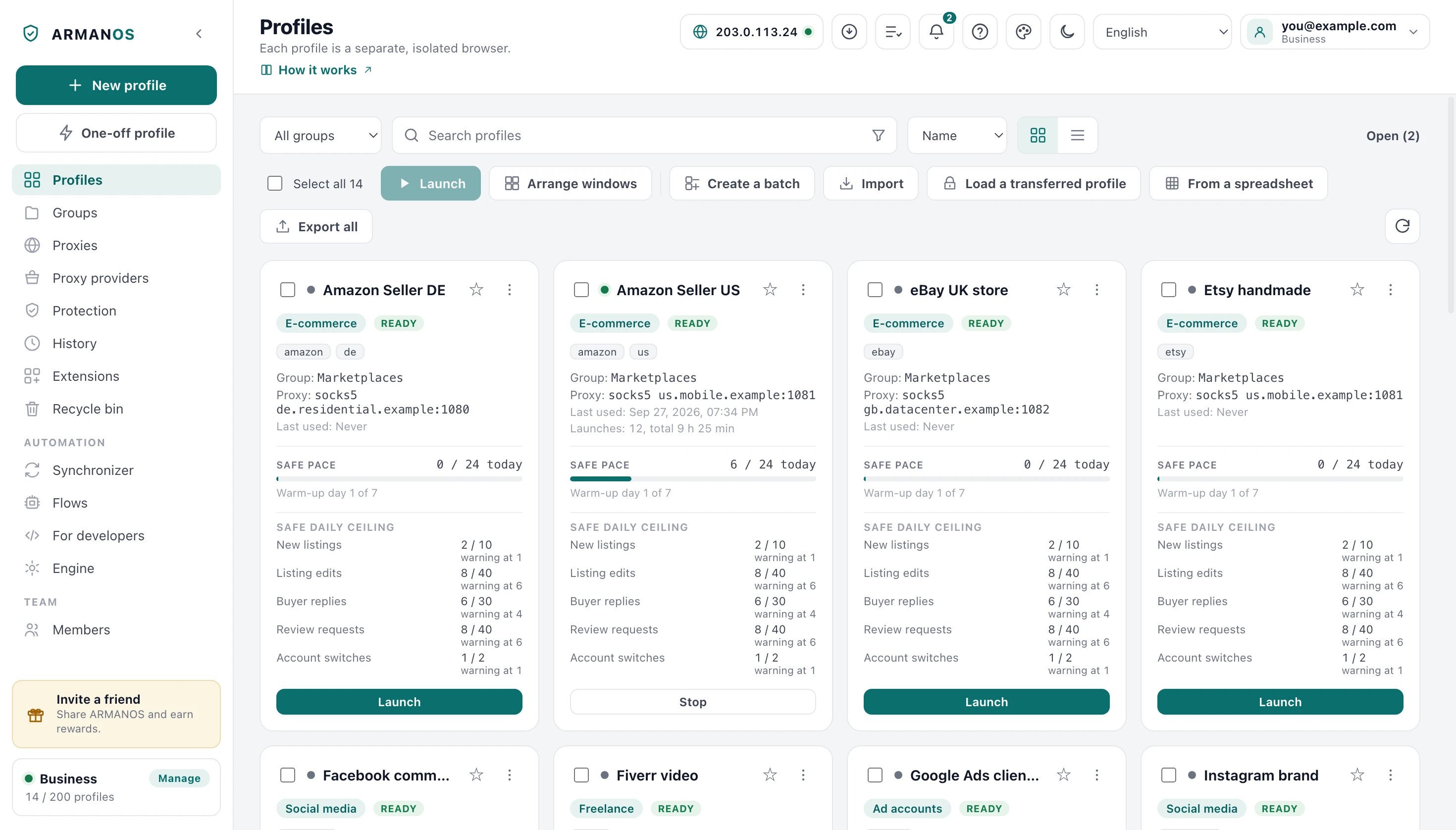
A profile is a browser session of its own, not a tab. It gets its own folder, and everything the engine keeps goes there: cookies, storage, cache and service workers.
Nothing crosses between two of those folders, because the engine never learns that the other one exists. A site you are logged into inside one profile sees nothing of the other.
Its own folder
Everything the engine keeps, from cookies and cache to service workers.
Its own extensions
Your enabled extensions load here only, next to a protection extension written for this profile.
Its own proxy
Address, credentials and exit country belong to the profile, not to the machine.
Its own fingerprint
It grows from the profile id.
Its own open tabs
After a crash the browser offers up to 30 of this profile's tabs back, and the offer stands for up to a week.
What you choose at creation
At creation you take a handful of decisions at once. There are five scenarios to choose from: privacy, e-commerce, social, ad accounts and freelance.
The app checks the opening address when you save, so a bad one fails in front of you rather than falling back to the scenario silently.
| Setting | What it decides | Default |
|---|---|---|
| Scenario | Injected scripts, tracker lists, daily action limits, start site | Privacy |
| Fingerprint template | Which machine the fingerprint claims | macOS · Chrome |
| Group and tags | How the profile is filtered and found | No group |
| Opening address | Where the profile opens, checked as http or https | The scenario's site |
| Browser kernel | Which installed kernel this profile runs on | Default |
| Headless | Runs without a window, for server-side flows | Off |
| One-off profile | A separate button in the left column: such a profile is removed with its data when the window closes | An ordinary profile |
The profile list on disk
The list holds names, groups, proxies and login details for everything you own. It is never written over the old one, so a power cut in the middle of a save cannot leave you with half a list.
An unreadable file is not an empty one. The app copies a damaged list aside before anything can overwrite it.
- 1
Beside it, never over it
The new content goes into a temporary file next to the real one, readable by your account only.
- 2
No space means a refusal
No space left or a disk that went away aborts the whole write instead of passing for done.
- 3
All of it or none of it
On disk you have either the whole old list or the whole new one, never half of either.
- 4
The access stays yours
Only you can read this file after every write, and the new name survives a power cut.
A failed write does not leave a lying screen
What a profile goes through at launch
Before it opens, a profile passes a sequence of gates, and each one is there because skipping it caused a specific harm. The ceiling on open profiles comes first, so nothing is spent on a profile that will not open.
- 1
Ceiling and seat
A profile takes its seat in the same step that checks the limit, so eight parallel launches cannot all see the same zero.
- 2
Proxy or nothing
A proxy that cannot be applied stops the launch, because going direct would show the site your real address.
- 3
Generation check
A profile made by a newer fingerprint generation than this build understands refuses to open.
- 4
Busy lock
The server marks the profile busy first, so a colleague cannot open the same account from another machine.
- 5
Session and exit
The profile pulls a newer session from the sync folder if one is configured, and a failed IP change stops the launch.
- 6
Geo, extensions, protection
The exit country sets the profile's clock and languages, and it gets a protection extension of its own.
The fingerprint is ready before the first script
A profile's fingerprint grows from its template, its id, its exit country and the engine version, and it is ready before the first page opens. ARMANOS Browser substitutes those values inside itself, so the first page script already sees the profile's machine.
How many open at once
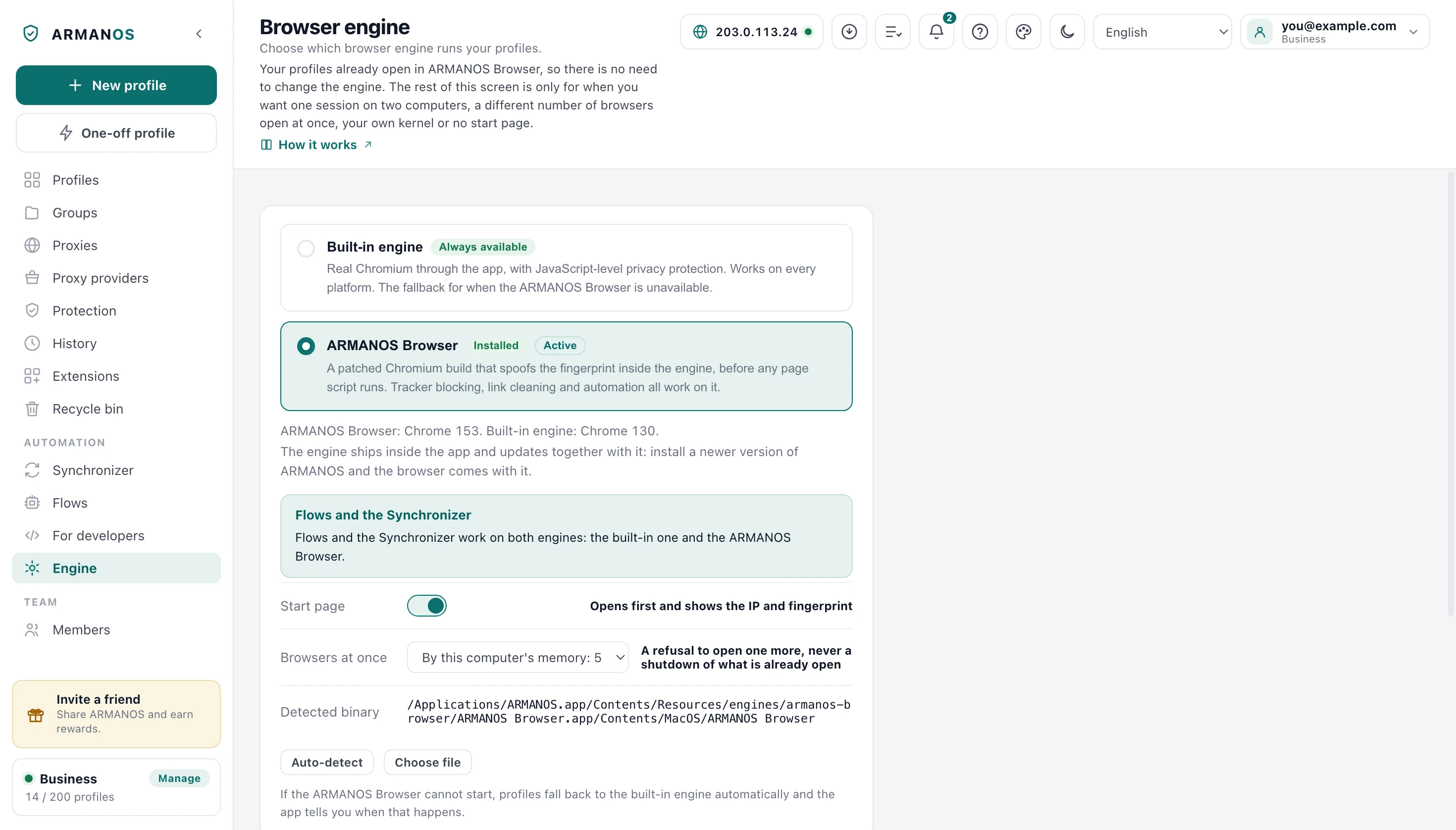
The ceiling depends on your machine rather than being written down in advance. Three gigabytes go to the system and the app, the rest is divided one gigabyte per browser, and the result never leaves 4 and 32.
The limit is soft: it refuses to open one more and never closes what is already open. The app tells that refusal apart from a breakage, so bulk launches and schedules wait up to 30 minutes for a seat instead of failing the profile at once.
- 4 GB of RAM
- 4 profiles, the floor
- 8 GB
- 5 profiles
- 16 GB
- 13 profiles
- 32 GB
- 29 profiles
- 64 GB
- 32 profiles, the cap
Your total memory minus 3 GB, one gigabyte per browser, and never outside 4 and 32. Your own number on the Engine screen wins while it stays inside the same range.
The recycle bin and Delete permanently
A deleted profile goes to the recycle bin. It drops out of every list and stops counting against your quota, and nothing on disk has been touched yet.
Delete permanently is the second button and it is meant literally. The profile's own browser closes first, because erasing under an open window is how erasing fails while the record disappears anyway.
What Delete permanently actually erases
If the browsing data on this disk could not be erased, you are told so.
Browsing data
Storage, cache, the name and credential caches, and the engine's own folder for this profile.
Local choices
Its extension selections, its schedules and its start page pass.
Records that outlive it
Its name in the launch notifications, its counters in the statistics and its daily action tallies.
The cloud copy
The sealed session bundle in the sync folder, so no second machine can bring the profile back.
Delete permanently cannot be undone
Quotas per plan
The plan decides how many profiles you may hold at once. Extra profiles beyond a tier cost $2 each per month, and a team seat beyond the ones included costs $3 per month.
The server counts the real quota and the app shows it to you on screen. Launches go through it as well, not only creates, and offline you can still create for 24 hours after the last successful check.
| Plan | Profiles | Devices | Team seats |
|---|---|---|---|
| Free | 2 | 1 | 1 |
| Professional | 10 to 100 | 2 | 1 |
| Business | 200 to 1000 | 5 | 3 |
| Enterprise | 5000 and up | 20 | 20 |
Not a browser profile
An ordinary browser separates profiles for convenience, not for concealment. Cookies are kept apart and that is where it stops: the same screen, the same graphics card, the same fonts, the same address.
Incognito is forgetting rather than separation, a VPN moves the address and touches nothing else, and a virtual machine costs tens of gigabytes per identity. Here the storage, the exit, the claimed machine, the extensions and the daily limits all belong to one profile at once.
| Way of working | Separate storage | Separate exit IP | Fingerprint changed inside the engine |
|---|---|---|---|
| Incognito window | Only until you close it | No | No |
| A second browser profile | Yes | No | No |
| A container tab | Yes | No | No |
| A VPN | No | Yes | No |
| A virtual machine | Yes | Only with a proxy | No, and it says it is a VM |
| A spoofing extension | No | No | No, it patches the page from the page |
| An ARMANOS profile | Yes | Per profile | On ARMANOS Browser yes, from a seed given at launch |
What this does not do
- The recycle bin does not empty itself. A trashed profile keeps its cookies and its whole folder on disk until it is deleted permanently.
- Isolation is per profile, not per machine. All your profiles share one computer, one clock source and one disk, and two profiles pointed at the same proxy share one exit address.
- Owner-only file permissions hold on macOS and Linux only. On Windows the profile file relies on the user folder instead.
- Your passwords inside the profile file are sealed by the system on Windows only. On macOS the key ships inside the program, and on Linux they are written as typed, so on both they are open to anyone who can read your user folder.
- The ceiling on simultaneously open profiles stops at 32 even on a very large machine, because beyond that the constraint is the processor and the network rather than memory.
How to check
Every claim above is one file away. These are the files, and the stands that keep them honest.
- A profile is created with its kernel version, and its id is the fingerprint seed
- apps/desktop/src/lib/profiles.js · apps/desktop/test/заготовки-и-пакет.js · apps/desktop/test/fingerprint-consistency.js
- The profile list is written atomically and with owner-only permissions, and a damaged file is copied aside instead of erased
- apps/desktop/src/lib/secureFile.js · apps/desktop/test/secrets-on-disk.js · apps/desktop/test/login-in-keychain.js
- The ceiling on open profiles is computed from this machine's memory, and the seat is taken before any network call
- apps/desktop/src/lib/engine-config.js · apps/desktop/test/предел-открытых.js
- Delete permanently erases the engine directory, the Electron partition and every record that outlived the profile
- apps/desktop/src/main/main.js · apps/desktop/test/purge-honesty.js · apps/desktop/test/purge-clears-cloud.js · apps/desktop/test/delete-leaves-nothing.js
- The quota follows the plan and is re-checked on launch, not only on create
- packages/shared/src/index.js · apps/server/test/quota-follows-plan.js
Questions
- What has to travel with a profile to a second computer?
- Its id above all, because the id is the fingerprint seed. Cookies moved without it produce a different computer holding the same logins, which is the worst combination available.
- Can I choose the profile number myself?
- A profile gets its number when it is created. It can only arrive with a profile that came from a transfer file, and it has to travel with it: the number is the seed of the device, and cookies carried without it produce a different machine with the same logins.
- Does a profile in the recycle bin still cost me a slot?
- No. Trashed profiles stop counting against the quota, while their data stays on disk until you delete it permanently.
- What happens when I restore one?
- Signed in, the server re-checks the quota first and can refuse, and that refusal aborts the local restore rather than showing a green message. A profile deleted on another machine arrives in your bin instead of vanishing.
- Why does a one-off profile behave differently?
- It counts against the quota while its window is open, so it is removed together with its data the moment you close it.
- Can two profiles run on different browser kernels?
- Yes. You choose the kernel per profile, and a profile made by a newer fingerprint generation refuses to open on an older kernel rather than presenting a different machine.
Open your first two profiles
The Free plan gives two profiles with every scenario and a proxy per profile. No card, and nothing to uninstall if it is not for you.