本頁面暫無您所用語言的版本,您正在閱讀英文原文。
Engine
Our browser engine
- ARMANOS Browser 153.0.7978.0
- Engine
- 39 source files, applied in one fixed order
- Patched Chromium files
- 9, and every one of them proven rather than merely listed
- Engine capabilities
- macOS Apple Silicon and Intel, Windows, Linux
- Builds
- Up to 37, inside the app
- Readings per profile
A Chromium build of our own
ARMANOS Browser 153.0.7978.0 is compiled from Chromium sources by us. It is not a plugin, not an extension and not a launch flag, it is the browser itself.
A page asks the browser, and the browser answers it with your profile's values rather than your computer's. The version a profile claims is the one that actually renders it and no other.
An installer with no engine in it never reaches you.
| Platform | What the app runs on your disk |
|---|---|
| macOS, Apple Silicon | Contents/MacOS/ARMANOS Browser inside the bundle |
| macOS, Intel | the same path inside the Intel build |
| Windows 10 and 11, 64-bit | resources/engines/armanos-browser/armanos-browser.exe |
| Ubuntu 22.04+, 64-bit | resources/engines/armanos-browser/chrome |
The answer is ready before the script
A site's script does not get there first. By the time it asks for navigator.platform, the browser is already answering with your profile's value.
All of a profile's values hold together and follow from its template, its id and its proxy exit country. So the same profile is still the same machine tomorrow and on another computer.
- 1
What goes into a profile's device
Screen, GPU strings, fonts, timezone, languages, device counts and network numbers.
- 2
The values travel over once
They go to the browser at launch, beside the profile's folder, its proxy and its language list.
- 3
A tab opened later is no different
A page opened ten minutes on sees the same machine the first one saw.
- 4
The page has nothing to override
It runs afterwards and finds not one replaced prototype.
What a site reads
Patches cover 39 files of the Chromium sources plus 10 new ones of our own. Every row in the table below is read by a site from your profile, not from your machine.
Two rules hold across the whole table. The same drawing reads back the same way for a profile rather than anew on every call, and numbers are rounded the way ordinary Chrome rounds them.
| Surface | What the page gets |
|---|---|
| Canvas readback | a stable perturbation on getImageData, toDataURL and toBlob |
| Audio | a stable perturbation on the buffer and the spectrum |
| WebGL strings | the profile's vendor and renderer, naming a card that exists |
| WebGL pixels | the perturbation of the canvas path, so two reads agree |
| WebGPU | buffers with an image copied in, not compute results |
| Fonts | only the profile's families, everything else falls back |
| Timezone | the zone of the proxy exit country |
| navigator identity | platform, user agent, vendor, cores, memory, touch points |
| Client hints | Sec-CH-UA and getHighEntropyValues() from the same values |
| Screen | size, available size, colour depth and pixel ratio |
| Media devices | counts of microphones, audio outputs and cameras |
| Speech voices | the voice list filtered to the profile's language |
| Network information | downlink, round trip time and effective type |
| Memory limit | the heap limit in line with the declared memory |
Where the engine takes over from the page
Not everything has moved into the browser yet. What it does not close, the app closes from the page, and that too happens before any script of the site runs.
Two layers on one value would get in each other's way: one drawing would read back two ways, and that stands out more than either layer alone. So wherever the browser takes the work, the page steps back from it.
What this build actually carries
The list below is not typed by hand, it is read off the build itself. A build that does not carry a capability will not claim it either.
webgl-readpixels
noise on WebGL pixel reads inside the engine
intl
timezone, locale, calendar and number separators
fonts
the profile's font list rather than the machine's
devices
counts of input and output devices
voices
speech voices filtered to the declared language
net
speed, latency and connection kind
memory
heap limit in line with the declared memory
webgpu
noise on image snapshots taken through WebGPU
net-mobile-fields
the three Android connection fields: type, downlinkMax, ontypechange
The built-in engine is weaker
A checker does not only read values. It compares what the browser declares against what it can measure, and page level spoofing is what creates the distance between the two.
So the app ships a second engine, Built-in engine on the Engine screen, and says which is which: Chromium through Electron, milestone 130, with protection injected as JavaScript. A profile falls back to it when ARMANOS Browser cannot start.
It will not happen silently. The profile opens anyway, and you get a notification naming the profile and the reason.
| Built-in engine, Chromium 130 | ARMANOS Browser, Chromium 153 | |
|---|---|---|
| Where the fingerprint is set | in the page, by injected JavaScript | in C++, before the first script |
| Font resolution | measurement is rewritten, drawing is not | only the profile's families resolve |
| Worker realm matches the main thread | yes, except the code a new shared worker runs at start | 是 |
| iframe realm matches the parent | – | 是 |
| Our tracker blocking and link cleaning | 是 | 是 |
| Flows and the Synchronizer | 是 | 是 |
| Available on every platform | 是 | 是 |
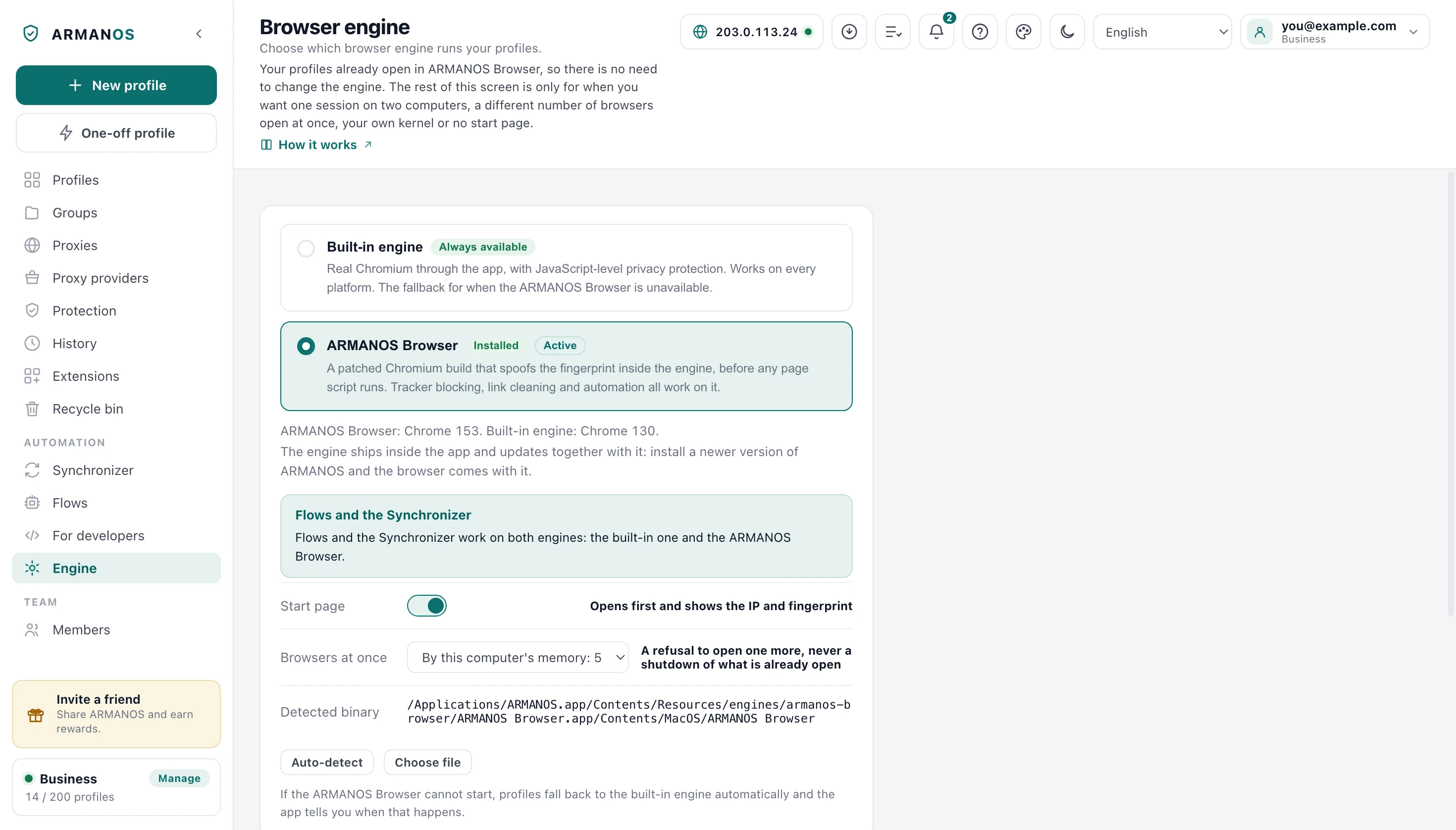
What ships beside the engine
Tracker blocking, link cleaning and the rest of the protections work on ARMANOS Browser too. A small extension brings them into the profile, built by the app at launch, and there is nothing for you to switch on.
Blocking with no trace on the page
A page sees no trace of that blocking and never waits on us for a request. So a hiccup in the app cannot stall the site you are on.
Tracker blocking
A blocklist, first party telemetry on known platforms, and tracking parameters.
Link cleaning
40 tracking parameters leave the link before the request leaves your machine.
WebRTC through the proxy
In the default WebRTC mode your real address does not leak past the proxy over UDP. Real shows it on purpose, and an extension with the privacy permission can too.
All traffic on the proxy
No request goes around the proxy, and an unknown proxy type gets a refusal instead of a quiet direct exit.
Proxy passwords off the command line
Your password never appears in the process command line.
Automation without the tell
The debugging port is reachable only from this machine, and a page does not see the automation bit.
What is checked before a build ships
A build with a failed check never reaches you. A check that could not be started counts as failed, never as skipped.
What is measured is the finished binary, the one inside the installer, compared against that same binary with no profile on it. The clean reference is not somebody else's browser but the engine itself.
Accepted with a caveat means nothing failed but something could not be checked in full, and we call such a build that out loud.
- 1
The profile's values really do arrive
The engine is launched with an exit country, what a page sees is read back, and the same engine with no profile is compared against it.
- 2
Four profiles, not one
A canvas defect can show on some profiles and not others, and one lucky profile would pass a broken build.
- 3
Our browser and stock Chrome, compared whole
An unexplained extra property is a refusal, not a detail.
- 4
A declared capability is backed up
No placeholders in the applied patch list, and no capability claimed for nothing.
Check it on your machine
Every profile opens on a start page listing the checkers this audience already uses: BrowserScan, BrowserLeaks, CreepJS, Pixelscan and an address lookup. That page lives on your own computer, so opening a profile is announced to nobody.
Inside the app the Fingerprint self-test (profile menu > Test fingerprint) reads up to 37 values from a live page and shows you whether each one matches what you set on the profile. It will refuse to score a window without protection rather than mark it red for nothing.
- navigator.platform
- Win32
- navigator.userAgent
- Mozilla/5.0 (Windows NT 10.0; Win64; x64) AppleWebKit/537.36 (KHTML, like Gecko) Chrome/153.0.0.0 Safari/537.36
- Cores and memory
- 12 logical cores, 8 GB
- Screen
- 1920 x 1080, available height 1040, pixel ratio 1
- WebGL vendor
- Google Inc. (AMD)
- WebGL renderer
- ANGLE (AMD, AMD Radeon RX 6600 (0x000073FF) Direct3D11 vs_5_0 ps_5_0, D3D11)
- Timezone
- America/New_York
- Languages
- en-US, en
- Fonts
- 25 families, all of them Windows ones
- Media devices
- 1 microphone, 3 audio outputs, 1 camera
- Network
- 4g, 10 Mbit/s downlink, 200 ms round trip
- Speech voices
- English only
- maxTouchPoints
- 0
One profile on the «Windows · Chrome» template, proxy exiting in the United States. Every value is derived from the profile id, so it is the same on the next launch and on another computer. Device counts are a ceiling: a device the machine has can be hidden, one it lacks cannot.
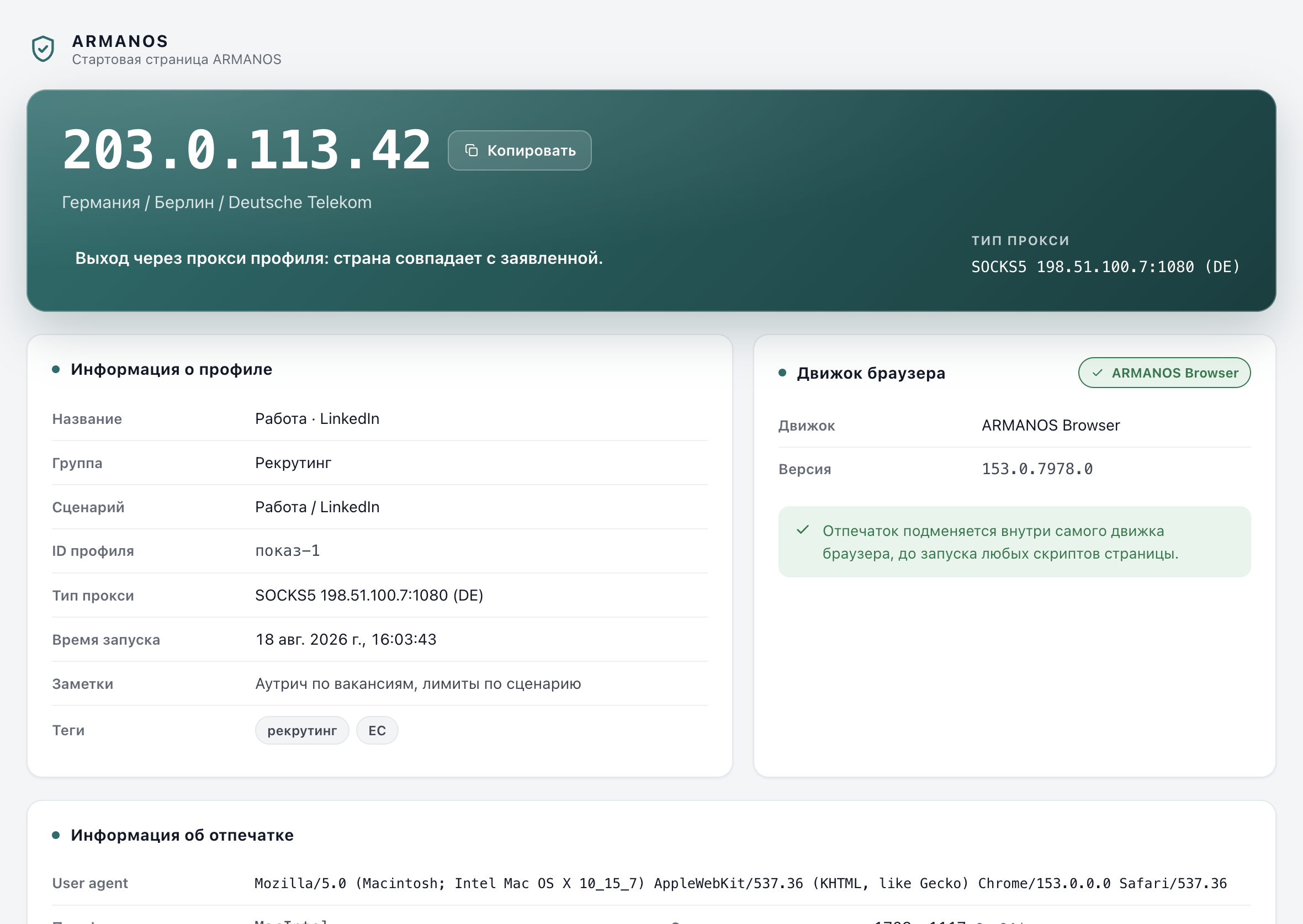
What this does not do
- WebGL pixel reads are covered for 8-bit RGBA on both roads: straight into memory and through a pixel pack buffer picked up later. Two shapes stay open, and we list them as open: RGB at three bytes per pixel, and float and half-float types. The noise reads only four-byte pixels, so a different layout passes it untouched.
- The real font inventory of the machine still shows through a lookup by unique name. Measurement is gated by the profile's list, and closing the lookup needs a further patch inside the font code.
- On macOS the engine takes its application language from the system language list rather than from its own launch switch, so the app hands it the profile's languages at launch. This build's first speech voice list arrives without the right default voice: it appears with the next voiceschanged event, while Chrome 154 has it at once.
- A profile whose template does not match the host gets the host's stock font families added, otherwise text does not render at all. Those names are visible to a page, and closing that needs the font list split into one list for drawing and one for answering.
- The automation bit is cleared by a public Chromium switch rather than by a patch. The switch works and is guarded by a stand that reads the value from a real page, but it is visible in the process command line to anything on the machine that can read it.
- What this sells is isolation and a consistent device, not invisibility. A site still sees your address, your behaviour and the history of the account you log into, and the engine has no opinion about any of them.
How to check
Each of these is a file you can open and a stand that fails the build when the claim stops being true.
- The fingerprint is substituted inside Chromium sources, applied at build time
- engine/patches/series · apps/desktop/test/engine-patches-real.js
- The WebGL readback noise is actually called, not dead code sitting in the patch
- engine/patches/armanos-fp.cumulative.diff · apps/desktop/test/engine-patches-real.js
- Every declared capability is proven by a marker in the patched file, not by a list
- packages/shared/src/index.js · engine/scripts/опись-умений.js
- The page level layer retires itself exactly where the engine takes over
- apps/desktop/src/lib/дыры-страницы.js · apps/desktop/test/страница-отходит-когда-движок-умеет.js
- A build is accepted by stands, and a partial check is not passed off as a full one
- engine/scripts/приёмка.sh · apps/desktop/test/сборочные-скрипты.js
- The installer refuses to ship without an engine, or with an engine of the wrong version
- apps/desktop/build/before-pack.js · apps/desktop/test/установщик-без-движка.js
Questions
- Which Chromium version does a profile claim?
- The one that renders it, 153.0.7978.0. A browser claiming a milestone whose features it does not have is a mismatch a site finds in one line.
- Can I run the engine on its own?
- The file will start, and with no profile on it, it behaves like stock Chromium with your own device. It gets a profile's device only when you open that profile from the app.
- Does an engine update change my profiles?
- No. A profile's device follows from its id, its template and the generation it was created with, and that generation is frozen for good.
- What happens on a build that lacks a capability?
- The app closes that surface from the page instead, and fields the build cannot fill are not shown to the page at all. The three Android connection fields, for one, go only to a build that carries them.
- Is the engine the same on all four platforms?
- The patches are one and the same, and every build reports the same version. What differs is the packaging around it, not what a page reads.
Keep reading
How ARMANOS works
The path from a profile to an open browser window, step by step.
What the app can do
Profiles, groups, teams, automation and the rest, with the files behind them.
Fingerprint checker
See what your current browser reports right now, in this tab.
Proxies
How a profile's traffic leaves, and what the engine does with the exit country.
Run it on your own machine
In ARMANOS, open a profile and read the start page before you visit anything. The engine ships inside the app.