このページはまだお使いの言語では用意されていません。英語の文章をご覧いただいています。
MCP
A server for AI assistants
- 10
- Tools exposed
- 127.0.0.1 by default
- Address it dials
- stdio, JSON-RPC
- Transport
- Node.js
- You install
What MCP does here
MCP is a shared language between an AI assistant and small programs that do real work. The assistant asks for a named action with named arguments, the program performs it and answers.
ARMANOS ships one such program: a single Node file with no third-party dependencies. Your AI tool starts it as a child process and talks to it over standard input and output.
No new road into your profiles
The server does no browsing of its own. Each tool call becomes exactly one request to the local automation API on loopback, the same interface a script of yours would use.
So the assistant is not given a new way into your profiles. It is given the way that already existed, with the same token and the same rules.
The app still has to be running
Ten tools ten routes
There are exactly ten tools, and every one of them maps to a route the local API already implements. Nothing on the list is a promise for later.
Each tool carries a description written for a model rather than for a menu. It says what comes back, so the assistant picks a call instead of guessing at one.
| Tool | What it does | Route it calls |
|---|---|---|
| get_status | Checks the local API is reachable and reports the app version | GET /status |
| list_profiles | Every profile, or one page filtered by search, tags, group, status and running, and like the Filters window by system, exit country and exit IP, kernel, no tags and last run. Profile notes are left out | GET /api/v1/profile/list |
| get_active_profiles | The ids of profiles with a window open right now | GET /api/v1/browser/active |
| launch_profile | Opens a window and returns its debugging endpoint | POST /api/v1/browser/start |
| stop_profile | Closes every window of one profile and counts them | POST /api/v1/browser/stop |
| create_profile | Creates a profile from a name, scenario, fingerprint template, proxy, notes, tags and location for sites; without presetId the default template of this computer fills what is not sent, and presetId none skips it. Profile notes are left out of the answer, the ones a template put there too | POST /api/v1/profile/create |
| update_profile | Changes only the fields you send, with the checks of the profile window, including fingerprint values set by hand, the site login and the 2FA key. Profile notes are left out of the answer, and so are the site password and the key | POST /api/v1/profile/update |
| delete_profile | Moves a profile to the recycle bin, restorable from the app | POST /api/v1/profile/delete |
| get_one_time_code | The current code and the seconds left | GET /api/v1/profile/code |
| list_proxies | The saved proxy library, passwords excluded | GET /api/v1/proxy/list |
What to tell the assistant
Everything you write to the assistant goes to its provider. Enter proxy passwords, site passwords and 2FA keys in the app, not in the chat.
The eight requests below are also in the app, on the For developers screen, with a Copy button. The ten tools of the MCP server carry out each of them.
Check that ARMANOS is reachable and tell me which profiles are open right now
Create 5 profiles named Shop-01 to Shop-05 in the group "Shops", Windows template
Open all profiles in the group "Shops" and tell me which did not open and why
Close all open profiles
Show the proxies from my library that failed their last check
How many profiles do I have in each group, and which of them are protected by a password
Give me the two-factor code for the profile "Etsy-2"
Move the profiles tagged "test" to the trash
The same profiles you see
There is no second store and no export. The assistant sees the same records you see on the Profiles screen, and a profile it creates shows up in the app immediately.
The assistant passes the same gate you pass when you press a button in the app. A locked licence refuses a launch, a create beyond your plan quota fails with the reason the app itself would give, and there is no relaxed mode on this path.
A launch comes back with the debugging endpoint when one exists. On ARMANOS Browser each profile gets its own endpoint, so a driving tool attaches to exactly that profile.
Identifiers
Profile id, name and scenario. The id is what launch, stop, delete and the code tool take as their argument.
Group and fingerprint template
Where the profile is filed and which of the five templates it wears.
Proxy summary
Protocol, host and port. The login and password stay inside the app.
Tags and times
Enough for the assistant to sort and choose without opening anything.
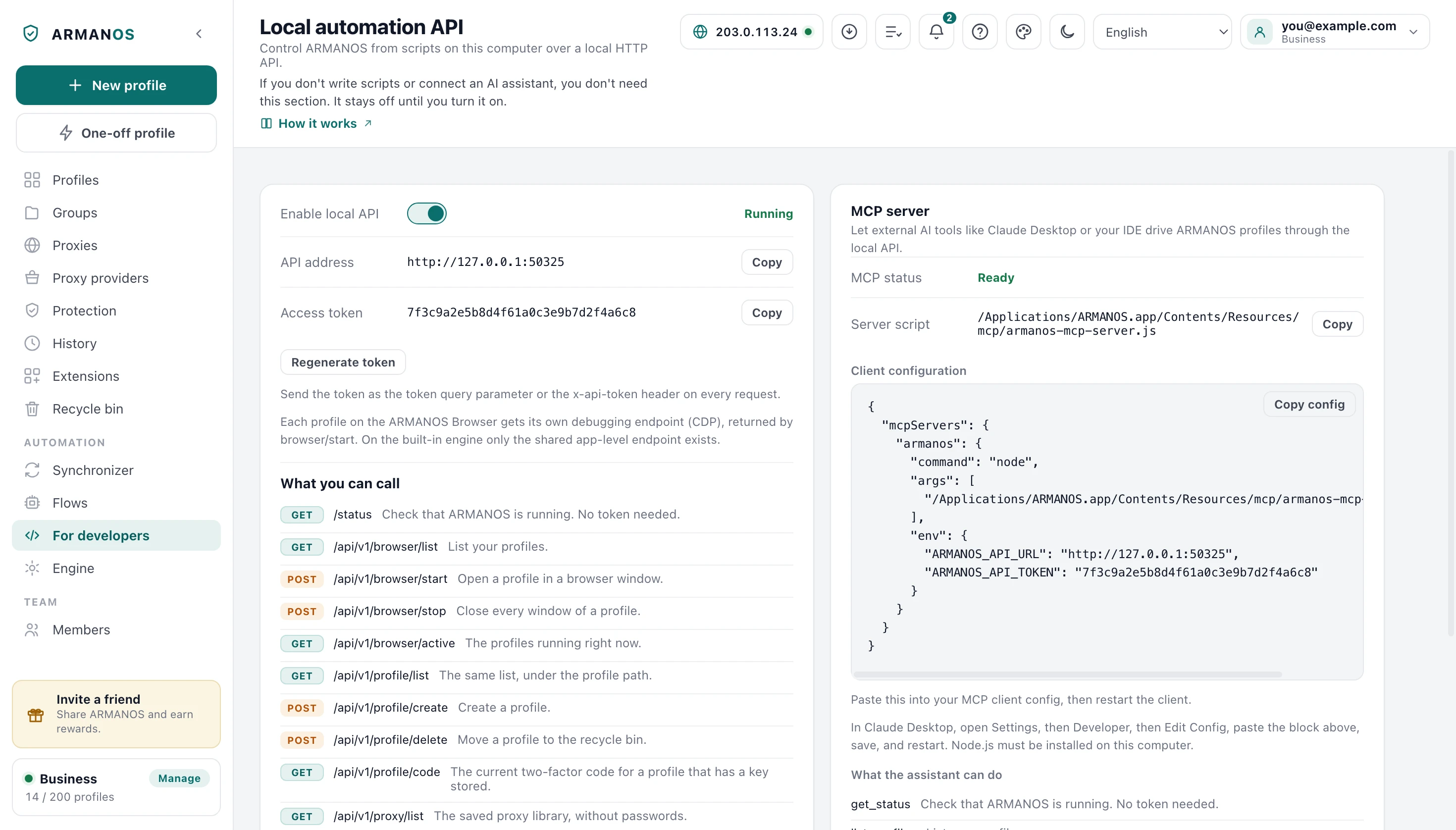
Connecting takes four steps
Everything you paste is generated for you. The app knows the script path inside the installation, the address the API is really listening on and your current token.
MCP status on the panel follows the API rather than a setting of its own. It reads Ready only while the local API is actually listening, so you never paste a config for a server that is not there.
- 1
Turn on the local API
Open For developers in ARMANOS and flip the switch.
- 2
Install Node.js
Your AI tool launches the server with the node command.
- 3
Copy the client configuration
One button copies the whole block, path, address and token already filled in.
- 4
Paste it and restart the client
Any MCP client reads a file of the same shape.
What the config holds
There is no account to create and no key from us. For the installed app two environment variables are the entire configuration, and the server reads them once when your AI tool starts it. On every call it also looks in the app's data folder for the port the API really listens on, and uses that port when the token there matches its own.
The path in the arguments points inside the installed app. On Linux builds where that path changes from one start to the next, the app copies the script next to its own data, so the path you set once keeps working.
- command
- node
- args[0]
- …/Resources/mcp/armanos-mcp-server.js
- env.ARMANOS_API_URL
- http://127.0.0.1:50325
- env.ARMANOS_API_TOKEN
- the token shown on the For developers screen
The whole block sits under mcpServers.armanos, the shape most MCP clients read.
The token stays local
The API listens on loopback and nowhere else. It is off until you switch it on, and the first run writes a random 48-character token into a file inside your account's folder.
Loopback on its own would not be a boundary. The pages you visit run on this machine too, so the API refuses a request that looks like it came from a page before the status route, and such a page does not learn the version.
Bound to loopback
Another computer cannot reach it, and neither can anything else on your network.
Token on every call
Sent as a header. Only the status route is open, and only to a program on this machine.
Pages get a refusal
The API refuses a request carrying the marks of a web page before the status route.
No credentials in answers
The proxy listing drops passwords, and a profile carries protocol, host and port only.
Codes not keys
The code tool returns the code and the seconds left. The 2FA secret itself never leaves the app.
The other end is your AI tool
One honest line about the other end. The server sends nothing to us and needs no internet, but whatever a tool returns lands in your assistant's context, and where that context is processed is a property of your AI tool.
That is why list_profiles, create_profile and update_profile leave out profile notes, where people keep logins and recovery codes, list_profiles does not search them, and the server has no cookie tools.
When a call fails
Neither a bad frame, an unreachable API nor a malformed reply will bring your assistant down. Instead of silence it gets a normal tool error and reads it out to you.
An API error reaches you in its own words rather than reworded. A refusal about a plan limit reaches you as a plan limit, not as a generic failure.
| Situation | What the assistant is told |
|---|---|
| App closed or local API off | That the local API is not reachable at the address it dialled, and what to do: open the app or switch the API on. |
| Token does not match | An API error with a hint to compare the token in the config with the one on the panel. |
| Unknown profile id | The refusal the API itself produced, passed through unchanged. |
| Reply over five megabytes | A message asking for a narrower request, instead of a call that never returns. |
| Launch runs past ninety seconds | A timeout naming the API. The window may still finish opening, so check the app before retrying. |
What this does not do
- It does not click, type or navigate inside a page. It opens and closes windows; driving the page needs a debugging client attached to the endpoint a launch returned.
- It does not run your saved automation flows. Those routes exist in the local API, but no MCP tool calls them today.
- It does not set a profile password or cookies. update_profile turns those fields down by name, so they stay a job for the app.
- It does not open a profile without a window just once. launch_profile has no such option, and update_profile with headless set to true makes the profile open without one every time.
- It does not work across a network. The API answers loopback only, so your AI tool and ARMANOS have to sit on the same computer.
How to check
Every claim above has an address in the repository.
- Ten tools, each bound to one local API route
- apps/desktop/src/mcp/armanos-mcp-server.js
- The token gate, and the refusal of anything that looks like a web page
- apps/desktop/src/lib/local-api.js · apps/desktop/test/local-api-gate.js
- The config block the app generates, path, address and token included
- apps/desktop/src/manager/renderer.js · apps/desktop/src/main/main.js
- The script path stays valid after a restart, AppImage included
- apps/desktop/src/main/main.js · apps/desktop/test/путь-mcp-переживает-перезапуск.js
- A random token, and the local API off until you turn it on
- apps/desktop/src/lib/api-config.js
- The server finds the port the API really listens on, and says whether the API is off or the app is closed
- apps/desktop/src/mcp/armanos-mcp-server.js · apps/desktop/test/mcp-находит-сдвинутый-порт.js
- list_profiles filters with the local API's own arguments and leaves notes out
- apps/desktop/src/mcp/armanos-mcp-server.js · apps/desktop/test/api-список.js
- The Filters window arguments in list_profiles and the local API give the same profiles as the window itself
- apps/desktop/src/manager/отбор-списка.js · apps/desktop/test/api-отборы-окна-живьём.js
- create_profile takes the default template of this computer, presetId none and another template; the template notes are not in the answer; a bad presetId is refused in words
- apps/desktop/src/mcp/armanos-mcp-server.js · apps/desktop/test/заготовка-api-и-mcp-живьём.js
Questions
- How long will the assistant wait for an answer?
- A launch is allowed ninety seconds and every other call fifteen. Opening a window on ARMANOS Browser waits for the engine to publish its debugging port, which takes longer than reading a list.
- Does the server batch or queue anything?
- No. Each tool call is one request and one answer, so your client's tool log shows exactly what was asked and what came back.
- What if the usual port is already taken?
- ARMANOS binds a free port instead and says so on the panel. The block you copy then carries the port actually in use, not the one that failed. A block pasted earlier keeps the old address, and the server looks up the new port in the app's data folder by itself.
- I regenerated the token and every call fails. Why?
- The block you pasted still carries the old one, and the API rejects it at once. Copy the block again and restart your AI client.
- Why does the assistant need my profile list first?
- It does not know your ids, so it starts by listing and matches your words against names, groups and tags. Only then does it call a tool that takes a profile id.
Read next
Local automation API
The routes the MCP server calls, and how to call them yourself.
Automation builder
Saved flows you run from the app, with steps you assemble without code.
One-time codes
Where the 2FA key lives and how the code reaches your automation.
Security
What stays on your computer, what leaves it, and what is protected how.
Turn it on and connect your assistant
In ARMANOS, open For developers, copy the config block and paste it into your AI tool.