Esta página ainda não está no seu idioma. Está a ler o texto em inglês.
Automation
Local API, keys and webhooks
- 50325
- Default port on 127.0.0.1
- 26
- Routes in the local API
- 8
- Scopes a server key can carry
- 13
- Events a webhook can carry
Where the API runs
The local API is a small web server inside the desktop app. Your own programs on the same machine call it over loopback and get an answer.
Everything it works with is on your disk: profiles, cookies, the engine and the proxy bridge. With the network down your scripts keep calling, and the app works offline for 24 hours.
Drive profiles from your own code
List, create, start, stop and delete them without touching the window.
Attach Puppeteer, Playwright or Selenium
You get back the debugging endpoint for that exact profile.
Run saved flows from outside
Your own scheduler or build server can start a flow over named profiles.
Let an AI client act
Through the bundled MCP server an AI client takes these same routes, and the API has to be on.
The switch and the token
The API is off until you turn it on, because enabling it opens a port. On first run the app writes itself a random token, 24 bytes shown as 48 characters, into a file only your account can read.
You can send the token three ways: as a parameter in the address, as a header, or as a bearer credential. Regenerate it and every script carrying the old one stops, so the app asks you to confirm.
- 1
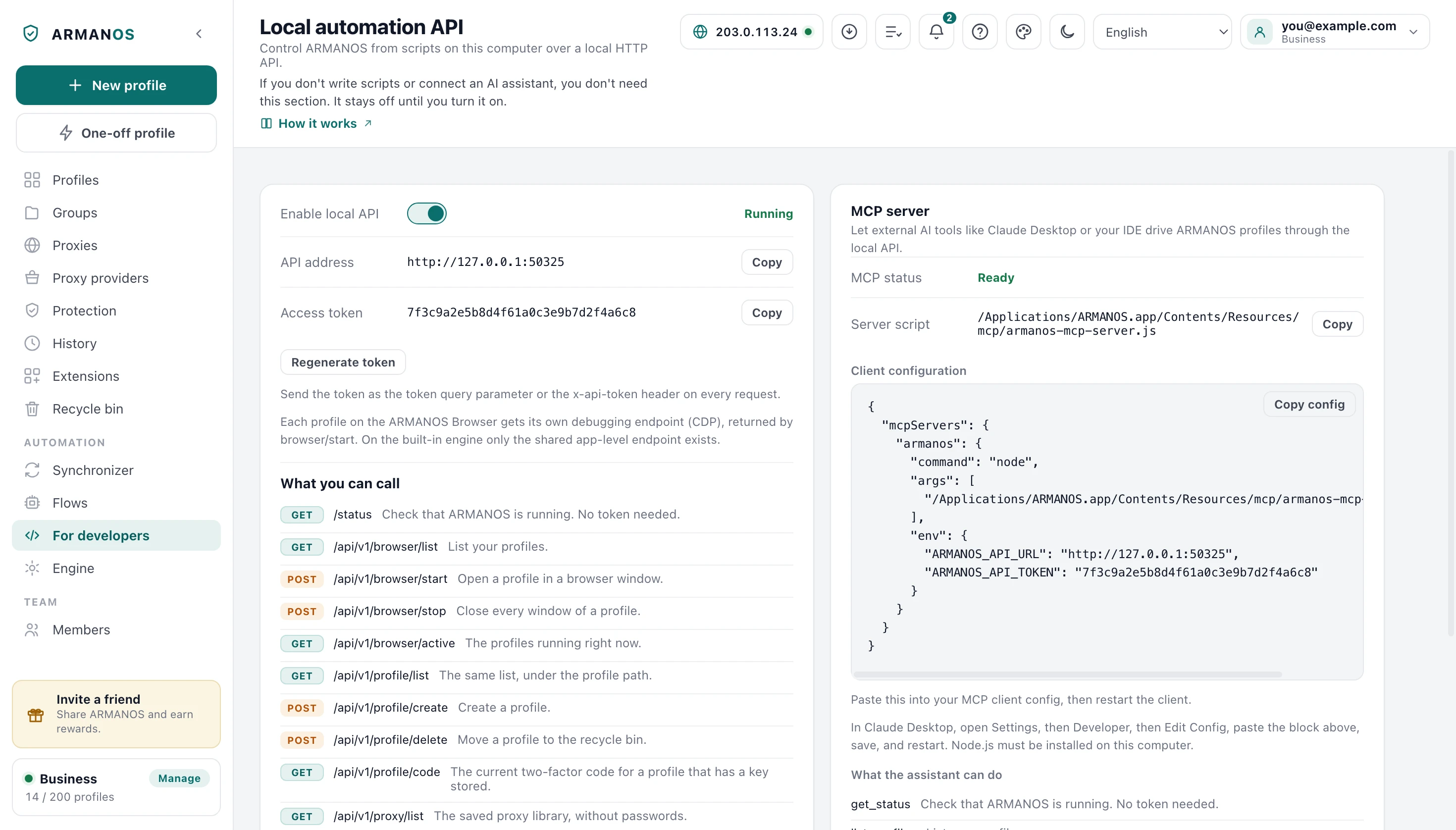
Open the For developers screen
It shows the switch, the address, the token and the list of routes.
- 2
Click Enable local API
You should see Running, and if the usual port was busy the panel names the one it took.
- 3
Copy the address and the token
The panel offers a ready command line with your own token already in it.
- 4
Point your script at it
Every call you make except the status route carries the token, and a wrong one gets you 401.
Why a page cannot call it
Binding to loopback sounds like a boundary. It is not one: the pages you visit run on this same computer, so they can reach that address as well.
So a page in your browser cannot reach it: the app recognises a call like that and refuses. A domain name pointed at loopback does not help either: it arrives under its own name and is turned away.
Even the status route sits behind that check
Routes and one envelope
An answer carries three fields: a code, the payload and a message. The code is 0 on success, and on a refusal you get the reason. The one exception is the call asking whether the API is up: it answers in a short form of its own, without the payload and message fields.
Branch on the code in the envelope rather than on the HTTP status: the status carries refusals at the door, while a refusal on the merits comes back as 200 with a non zero code. A body over a megabyte is not trimmed: it gets 413 with payload_too_large, and loading cookies, a one-time profile and import take up to 16 MB.
- Call
- curl -H x-api-token:YOUR_TOKEN http://127.0.0.1:50325/api/v1/browser/list
- Envelope
- { code: 0, msg: success, data: { list: [ ... ] } }
- One profile
- profileId, name, scenario, group, fingerprintTemplate, tags, notes, status, lastUsedAt, launches, runTimeMs, running
- Its proxy field
- protocol, host, port. Never the login, never the password
- Wrong token
- HTTP 401, { code: -401, msg: unauthorized }
- Called from a page
- HTTP 403, { code: -403, msg: forbidden }
On a path it does not know you get 404. You can also send the token as a query parameter or as a bearer credential.
| Route | Method | What it does |
|---|---|---|
| /status | GET | Says the app is up and names its version. The only route with no token. |
| /api/v1/browser/list | GET | Your profiles, each with the state it is in now. |
| /api/v1/profile/list | GET, POST | The same set with filters, order and pages; POST takes a long list of ids in the body. |
| /api/v1/profile/quick | POST | Creates a one-time profile and opens it; it is deleted when it closes. |
| /api/v1/browser/start | POST | Opens a profile and answers with its debugging endpoint. A profile pinned to a kernel this computer does not have is not opened and answers kernel_missing, or kernel_builtin when the built-in engine is chosen or ARMANOS Browser did not start. |
| /api/v1/browser/stop | POST | Closes every window of a profile and says how many. |
| /api/v1/browser/active | GET | The ids of the profiles open at this moment. |
| /api/v1/profile/create | POST | Creates a profile through the same quota gate as the window. Without presetId the default template of this computer fills it, and what the body sends wins; presetId none makes it without a template. A template that cannot be used answers preset_not_found, preset_no_free_proxy or preset_password_needs_account. |
| /api/v1/profile/update | POST | Changes only the fields you send, through the same checks as the window. Where this app version cannot change an account profile's hand-picked values or kernel, it answers fp_edit_paused. |
| /api/v1/profile/delete | POST | Moves a profile to the recycle bin. |
| /api/v1/profile/unlock | POST | Opens a profile closed with a password, for one launch or until ARMANOS closes. |
| /api/v1/profile/lock | POST | Closes a password-protected profile again at once. |
| /api/v1/profile/password | POST | Sets or changes the password of a profile. |
| /api/v1/profile/password/remove | POST | Removes the password, given the current one. |
| /api/v1/profile/code | GET | The current one-time code for a profile with a 2FA key stored. |
| /api/v1/profile/cookies | GET | Cookies of one profile, as JSON or Netscape text. |
| /api/v1/profile/cookies/export | POST | Cookies of up to 100 profiles, with an answer for each. |
| /api/v1/profile/cookies/import | POST | Loads cookies into a profile, open or closed. |
| /api/v1/profile/export | POST | Settings in the answer or full archives with the session, up to 100 profiles. |
| /api/v1/profile/import | POST | Brings profiles back from settings or archives, with an answer for each. |
| /api/v1/proxy/list | GET | Hosts, ports and usernames from the saved library with the last check result, never the passwords. |
| /api/v1/preset/list | GET | Templates of this computer: the id for presetId in profile/create and which one is the default. |
| /api/v1/flow/list | GET | Saved automation flows with the number of steps in each. |
| /api/v1/flow/run | POST | Runs a flow over the profile ids you name. |
| /api/v1/app/state | GET | Whether the program is signed in and as whom, the engine, open profiles and the video card. |
| /api/v1/app/login | POST | Signs the program in with a Dashboard code, email and password, or an account key. |
Starting a profile from code
You can pass the profile id in the body or in the query string: both examples below use the query string, and neither has to be rewritten. Ask for a run without a window, or send nothing and the profile's own setting decides.
Three engines, three answers
What comes back depends on the engine. On the ARMANOS Browser each profile gets its own debugging endpoint, isolated from every other profile.
ARMANOS Browser engine
A port and a socket address for this profile only. Attach your automation library straight to it.
Built-in engine
One shared port for the whole app, named in the answer with a warning that it is shared.
Neither available
You get an answer saying no endpoint is open and why, rather than an empty field.
Server keys and their scopes
The token above drives one installation on one computer. A server key is a different thing: it talks to our server from anywhere, and it never opens a browser window.
You see a key once, at creation, and we keep only enough of it to tell your keys apart. Keys belong to the paid plans, you may hold 20 live ones, and a change of plan reaches a key within a minute.
| Scope | What it opens |
|---|---|
| profiles:read | The profile list, and searching it with filters, order and pages. |
| profiles:write | Create, edit and delete a profile. |
| browser:run | Mark a profile open or closed on the server, without the right to edit it. |
| proxies:read | The saved proxy list, without passwords. |
| proxies:write | Create, edit and delete a proxy, if the member's role allows it. |
| flows:read | The list of saved automation flows. |
| logs:read | What the Actions, Profile sessions and IP log tabs show, and the suspicion rules. |
| app:signin | Sign the ARMANOS program in on a server, as a device that takes a seat. Not ticked by default; a sign-in with a key cannot issue keys, change the password or touch billing. |
Webhooks to your own server
A webhook is our server calling yours when something happens in your workspace. Subscriptions are created by a person signed in with a password, never by a key, and a new one asks for the password again, and for the two-step code if it is on. You may keep up to ten.
Each call is signed, and fields whose names look like a credential never reach your receiver. An invite code or a password reset link never leaves for a third party server.
Profiles
profile.create, profile.update, profile.delete, profile.start, profile.stop, profile.transfer.accept
Proxies
proxy.create, proxy.update, proxy.delete
Keys
apikey.create, apikey.revoke
Team
team.invite, team.remove
Money
plan.change
What a delivery looks like
Delivery is honest about failure: three attempts, retried on a server error, on a too many requests refusal and when no answer came at all, and you see the last status on the subscription itself. After fifteen failures in a row the subscription switches itself off.
- Method
- POST, Content-Type application/json
- X-Armanos-Event
- profile.start
- X-Armanos-Timestamp
- Unix seconds, also part of the signature
- X-Armanos-Signature
- sha256=... HMAC of timestamp and body
- Body
- { id, event, createdAt, data }
- Delivery
- At least once. Keep the id and drop repeats
Redirects are not followed, because an answer pointing back at loopback would undo the address check. A test send carries a test flag, so your system does not create a phantom profile.
The address is re-checked before every send
What this does not do
- The local API reaches only the copy of ARMANOS on that one computer. There is no cloud route that opens a browser window for you, and a server key starts nothing: it only marks a profile busy and writes the log.
- The local token is one token for the whole API. It has no scopes, no expiry and no per-route rights, and regenerating it stops every script you have at once.
- The local API has no rate limit of its own. It trusts the machine it runs on, so against an unwanted call you are covered there by the page check and the token alone.
- Server keys cannot create keys or webhooks, and any route with no declared scope is closed to them. The recycle bin, the fingerprint preview, proxy rotation and checks, and flow editing are all password only.
- Webhook delivery is at least once, and a call carries only the fields left after redaction. Your receiver has to drop repeats by id and fetch the object itself when it needs more than the event.
How to check
Every claim on this page comes from a file you can open, and most are held by a stand that runs.
- The local API refuses browser-shaped requests, and /status sits behind that check too
- apps/desktop/src/lib/local-api.js · apps/desktop/test/local-api-gate.js
- The unprotected app-level debug port is opened only for the built-in engine
- apps/desktop/src/main/main.js · apps/desktop/test/cdp-port-only-when-needed.js
- The token is random per installation and the API starts out disabled
- apps/desktop/src/lib/api-config.js · apps/desktop/src/main/main.js
- Server keys are a paid tool, and every scope guards a real route
- apps/server/src/api-keys/api-keys.service.ts · apps/server/test/ключи-платные.js · apps/server/test/права-ключей-живые.js
- Webhooks are signed, cannot be aimed inside our network, and record their failures
- apps/server/src/webhooks/webhook-dispatch.service.ts · apps/server/test/webhooks.js · apps/web/test/webhooks-web.js
Questions
- What happens if the default port is already taken?
- The server takes a free port instead and the panel names it. Your scripts still point at the old address, so read the panel after a restart rather than assuming 50325. The MCP server looks up the new port by itself.
- Which answer means the key expired rather than the rights?
- 402 means the paid time ran out, 401 means the key is bad or revoked, and 403 means a missing scope. Three different codes, so a program can act instead of guessing.
- Can a key create another key?
- No. Keys and webhook subscriptions are created only by a person signed in with a password, so one leaked key cannot mint more of itself. A new key or subscription also asks for the person's own password again, and for the two-step code if it is on. Blocking an account kills its keys on the next call.
- What do the two packages for developers give me?
- One for Node and a single file for Python that imports nothing outside the standard library. Both read the key and the address from the environment, give up after 30 seconds, and return typed errors rather than a message that may be translated.
- How do I check a webhook signature on my side?
- Both packages ship that check: it compares in constant time and refuses anything older than 300 seconds. Without it, anyone who learns your address can send you an invented event.
- Does the log show that a script did it rather than a person?
- Yes. When a call arrives through a key, you see the key id in the log row as well, so one leaked key does not mean revoking all of them.
Read next
MCP for AI clients
The bundled server that gives an AI client these same routes.
Automation builder
The very flows you start from outside.
Scheduler
Runs inside the app on a schedule, when you would rather not write your own.
Plans and prices
Which plans carry API keys, and what a seat or an extra profile costs.
Turn it on and call it today
The For developers screen is in every build. Switch the local API on in the app and point your script at 127.0.0.1.