Esta página ainda não está no seu idioma. Está a ler o texto em inglês.
Two-factor
One-time codes inside the profile
- RFC 6238 over RFC 4226
- Standard
- 6 digits, 30 second step
- Code
- SHA1, SHA256, SHA512
- Algorithms
- On your machine, no network
- Where it is computed
A phone does not scale
Two-factor protection is no longer optional. Marketplaces, ad accounts and social platforms all ask for six digits at sign-in, and they ask often.
With two accounts a phone is fine. With fifty it becomes the slowest part of the day: unlock, find the right entry among fifty that look alike, read the digits, type them before they roll over.
What changes when the key lives here
The secret behind those digits already sits next to the account, in a sheet or a note or a shared vault. ARMANOS moves it one step closer, into the profile that signs in with it.
No second device
The code appears in the same window where the profile lives.
No hunting for the right entry
The key belongs to the profile, so there is nothing to match by name.
No retyping under time pressure
Copy the code, or let a flow type it into the form.
Nothing goes over the network
The app makes the code out of the key on this computer.
Where the key goes
Open the menu on a profile card and pick One-time code. If the profile has no key yet, the window asks for one instead of showing digits.
Paste either form: the bare key a site prints beside its QR code, or the whole otpauth:// line that the code itself contains. From the link the app reads the issuer, the account name, the number of digits, the step and the algorithm, so an unusual site is best pasted as a link.
Four steps to the first code
- 1
Open the profile menu
One-time code sits in the same menu as Fingerprint and Sign-in details.
- 2
Paste the key
JBSWY3DPEHPK3PXP or otpauth://totp/... Spaces, dashes, lower case and = padding are all tolerated.
- 3
Save
A key that cannot produce codes comes back as an error, and nothing lands on disk.
- 4
Look at the card
A 2FA mark appears on the profile, so you see at a glance which accounts no longer need a phone.
How a code is made
It follows RFC 6238 over RFC 4226, the same standard the app on your phone follows. The current time is divided by the step to give a counter, the counter is hashed with your key, and out come the digits the login form is asking for.
The counter goes into eight bytes as two halves, exactly as the standard asks, so a shorter four byte write cannot quietly break it. All six published vectors check out, the furthest at t=20000000000.
Nothing goes anywhere: the key stays in your file and the app does the work itself, so you get a code with the network switched off entirely.
| Setting | Default | What is accepted |
|---|---|---|
| Digits | 6 | 6, 7 or 8, taken from an otpauth link |
| Step | 30 seconds | 1 to 300 seconds, taken from the link |
| Algorithm | HMAC-SHA1 | SHA1, SHA256 and SHA512 |
| Key format | base32 | Spaces, dashes, lower case and = padding |
The window shows the code
The code sits large in the middle, grouped three and three, because 482 913 is easier to carry across to a form than 482913. The copy button puts it on the clipboard without the space.
A bar under the code drains as the window closes, and the last five seconds are marked so nobody starts typing a code that is about to roll over.
The line above names the issuer and the account read from the link. That is what tells you the code belongs to the account you think it does, when a profile is one of fifty.
A script asks for a code
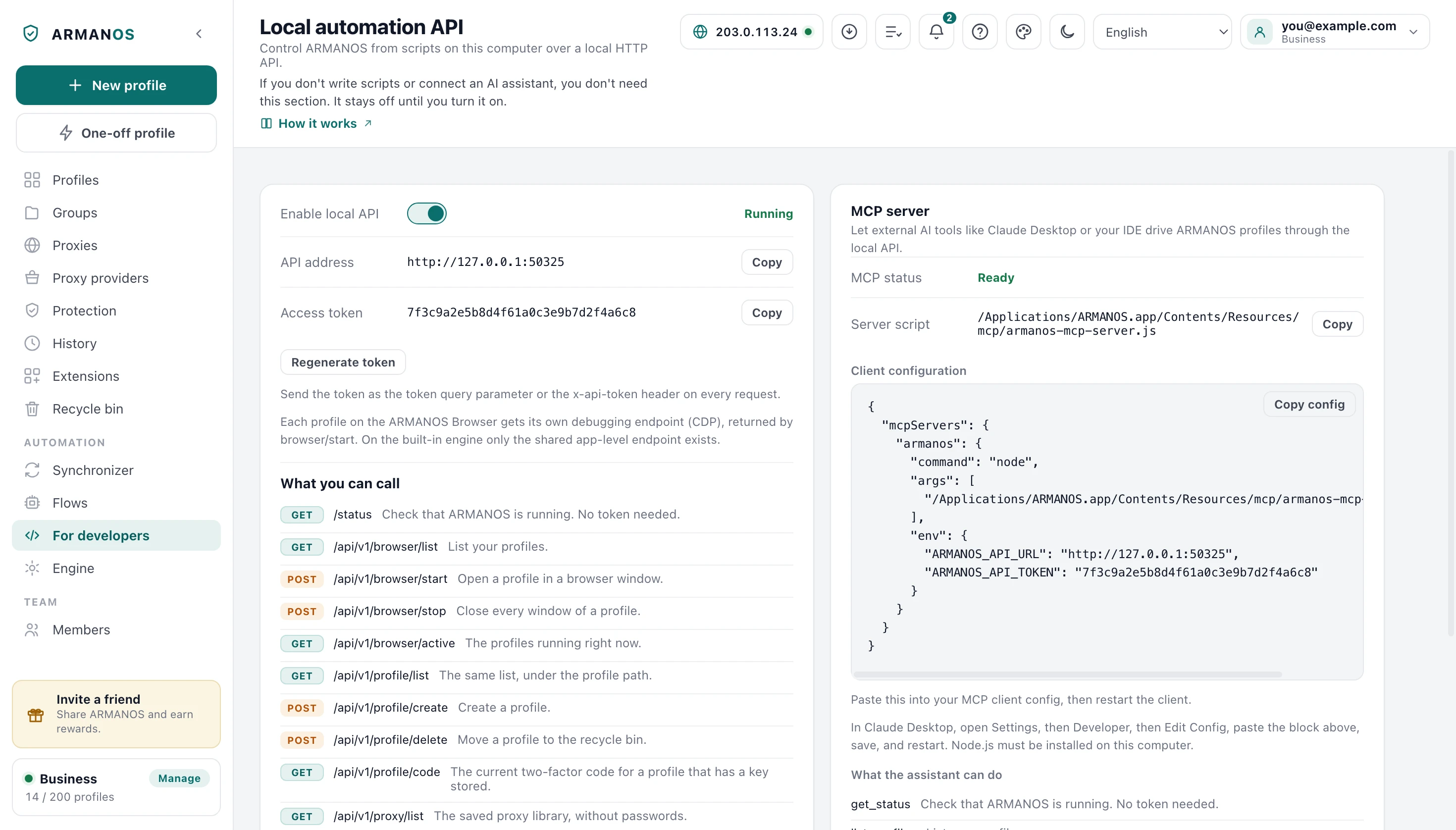
The app carries a local HTTP API for programs on the same computer. It is off until you switch it on, it listens on the loopback address only, and every call carries a token except one: the call that asks whether the API is up.
One call names a profile and hands back the current code with the seconds remaining. That is the point of doing this over an API: a script that signs in needs the second factor at the moment the form asks, not thirty seconds earlier.
An AI assistant reaches the same route through the bundled MCP server, under the same token and the same refusals.
- Call
- GET /api/v1/profile/code?profileId=p-42
- Token
- token parameter, x-api-token header or Authorization: Bearer
- Answer
- { "code": 0, "data": { "code": "482913", "secondsRemaining": 17, "issuer": "Shop" } }
- Profile has no key
- code -1, msg no_2fa_key
- No token or a wrong one
- HTTP 401
- Sent from a web page
- Refused, whatever the token says
The 0 is the envelope status shared by every route. The six digits are in data.code.
A flow types it in
On the Flows screen any text field of a step accepts {{profile.totp}}. Put it in an input step aimed at the code field on the login page, and the flow fills it in like the rest of the form.
The variable is a fresh calculation, not a stored value. A code taken at the start of a run would already be stale by the third step, so the profile hands it over at the very moment the flow types it in.
The step log never prints it: where a value came from a variable, four dots stand in its place. The flow clicks into the field, clears it with a shortcut and puts the whole code in with one real input event. If the form waits for key presses letter by letter, put the code in a Type like a person step.
The key stays here
The key lives in profiles.json in the app data folder, next to the rest of the profile. A power cut cannot tear it in half: what you are left with is either the old file whole or the new one whole.
The file carries owner-only permissions, and they travel with it when it is copied into a backup or a synced folder. On Windows they mean nothing, and what protects the file there is your user profile folder, which other accounts do not enter without administrator rights.
You decide where the key travels action by action, not once and for all. A duplicate never takes it, because a copy is meant for a different account.
The key is not encrypted on disk
Fifty keys from a table
The app recognises a 2FA column by its name, in English and in Russian alike, so a table you already have usually needs no renaming.
No profile is created until you have seen which column became which field. Rows whose key cannot produce codes are marked before the import, and one checkbox skips them instead of giving you profiles with a broken key.
Restoring a profile export carries the digits, the step and the algorithm along with the key. Reading back only the bare secret would quietly reset an 8-digit or 60-second key, and the account would simply stop letting you in.
What this does not do
- It is not a password manager. One key per profile, no vault, no search across keys, and nowhere to put the backup codes a site hands you.
- The key is not encrypted on disk. File permissions close it to other users on macOS and Linux; on Windows only the user profile folder does that.
- A lost key is lost. It never reaches the server, and nothing in the app can rebuild it from the codes it has produced.
- The app reads no pictures. You paste the key text or the otpauth:// line; it does not scan a QR image or a phone screen.
- The code follows this computer's clock. If the clock drifts, sites refuse the code, and the app does not warn you that this is why.
How to check
Every claim above has a file behind it, and most have a stand that fails when the claim stops being true.
- The codes match all six published RFC 6238 vectors, including the furthest one
- apps/desktop/src/lib/totp.js · apps/desktop/test/totp.js
- The file holding the key is written owner-only, and files left open by older versions are closed at startup
- apps/desktop/src/lib/secureFile.js · apps/desktop/test/secrets-on-disk.js
- The code route answers only with the token, and never a web page
- apps/desktop/src/lib/local-api.js · apps/desktop/test/local-api-gate.js
- A flow computes the code at the moment it substitutes it
- apps/desktop/src/main/main.js · apps/web/test/страница-возможностей.js
- A restored profile keeps its digits, step and algorithm
- apps/desktop/src/main/main.js · apps/desktop/test/config-import-2fa.js
Questions
- Is this the two-step sign-in on my ARMANOS account?
- No. This key belongs to the account a profile signs into, while the second step on your own ARMANOS account is a separate thing, kept on the server with recovery codes.
- What if my site issues 8 digits or a 60 second step?
- Paste the whole otpauth:// line, which carries those settings itself. A bare key carries none of them, so the app falls back to the common defaults, and it refuses a link that counts sign-ins rather than seconds outright.
- Can a web page read my codes?
- No. The app refuses a call that looks like it came from a page whatever the token says: an Origin header, a Sec-Fetch-Site other than none, or a host that is not the loopback address all give it away.
- Does the key travel to a second machine?
- Sign in on another machine and the key is not there, because the server has no column for it. Only a profile transfer brings it, under your password, while an export strips secrets unless you press Include secrets and a problem report always cuts it out.
- What happens when I replace or remove a key?
- Replace the key swaps it for a new one, which is what you do after re-enrolling an account. Remove asks for confirmation first, and the change history records that the key changed, never its value.
- Can I add keys to profiles I already have?
- One at a time, in the profile window. There is no bulk action for it: fifty keys arrive as a column of your table at the moment you create the profiles.
Read next
Profiles
Each account gets its own browser: cookies, storage, fingerprint and proxy.
Local API
The route that hands a script the code, and the token that guards it.
Flow builder
Where {{profile.totp}} goes into the login form.
Import from a spreadsheet
Bring names, proxies and 2FA keys in from a table you already have.
Put the key where the account lives
In ARMANOS, add a key to one profile and see the code appear in the same window.